-

-
-
Product

Solutions
One app, all things legal

Compare
-
-
-


 Gmail
Gmail  Microsoft 365
  Wisetime
  Dropbox
  Zapier
  Quickbooks
  vs CosmoLex
  vs PracticePanther
  vs AbacusNext
  vs Caret Legal
  vs Clio
  vs MyCase
  vs Smokeball
  vs Filevine


Client Portal Communication for Law Firms
20th October 2026
A client portal is useful only when clients know what it is for. A secure login alone does not solve the familiar questions: “Has anyone seen my document?” “When will I hear about the hearing?” “Should I send this by email or upload it?” A law firm client portal communication plan answers those questions before they become a stream of calls.
This guide gives U.S. firms a practical operating model for portal invitations, matter updates, document exchange, response times, and closing access. It complements the Lawcus client portal product page with a process a firm can adapt to its practice area and client needs.
Start with a communication promise, not a feature tour
The first message should explain which information the firm will share, how often it will update the client, who to contact for an urgent issue, and what the portal cannot do. A portal is not an emergency line. It is also not a substitute for the lawyer’s professional communication duties. ABA Model Rule 1.4 addresses keeping clients reasonably informed and responding to reasonable requests for information; firms should follow their jurisdiction’s rules and the needs of the representation.
Write a short client-facing policy in plain language. For example: “We use the portal for routine status updates, approved document exchange, and nonurgent messages. We usually acknowledge portal messages within one business day. Call the office if a deadline or safety issue cannot wait.” The exact commitment must match your staffing and practice. An unkept promise is worse than a modest, reliable one.
Decide what goes into the portal
Clients need a clear, curated view. Share documents and events that help them understand the next action. Do not assume every internal note, draft, calendar event, or task should become client-visible. Before rollout, define categories:
- Share routinely: signed engagement documents, approved requests for information, meeting details, completed client-facing documents, invoices when appropriate, and a short status note after meaningful milestones.
- Share after attorney review: drafts for client comment, court filings, discovery materials, settlement information, and sensitive advice.
- Keep internal: preliminary analysis, privileged internal discussion, conflict checks, strategy notes, staff assignments, and documents concerning another client.
A permissions checklist should name who approves each category. In a family-law or employment matter, a wrong recipient can create a serious confidentiality problem. Test access with a sample matter before inviting real clients. Document how the firm verifies recipient identity and removes access when representation ends.
Map the moments clients actually need an update
Many firms update clients only when a client asks. Replace that pattern with event-based and cadence-based updates. A useful schedule begins at engagement, then covers matter opening, the first document request, a major filing or meeting, a material change, and closing. Long matters also need a quiet-period update: “Nothing material has changed; here is what we are waiting for and when we will check again.”
The update should answer four questions: What happened? What does it mean? What does the client need to do? When will the firm next be in touch? Avoid internal shorthand and unexplained docket language. If the firm cannot responsibly give a date, state the next review point rather than promising an outcome.
Set a named owner for each update. A matter manager can prepare routine information, but the attorney should approve advice, assessments, and sensitive communications. The task management and workflow automation pillars show how teams can assign and track repeatable follow-up without treating legal judgment as an automated action.
Use a message template that creates clarity
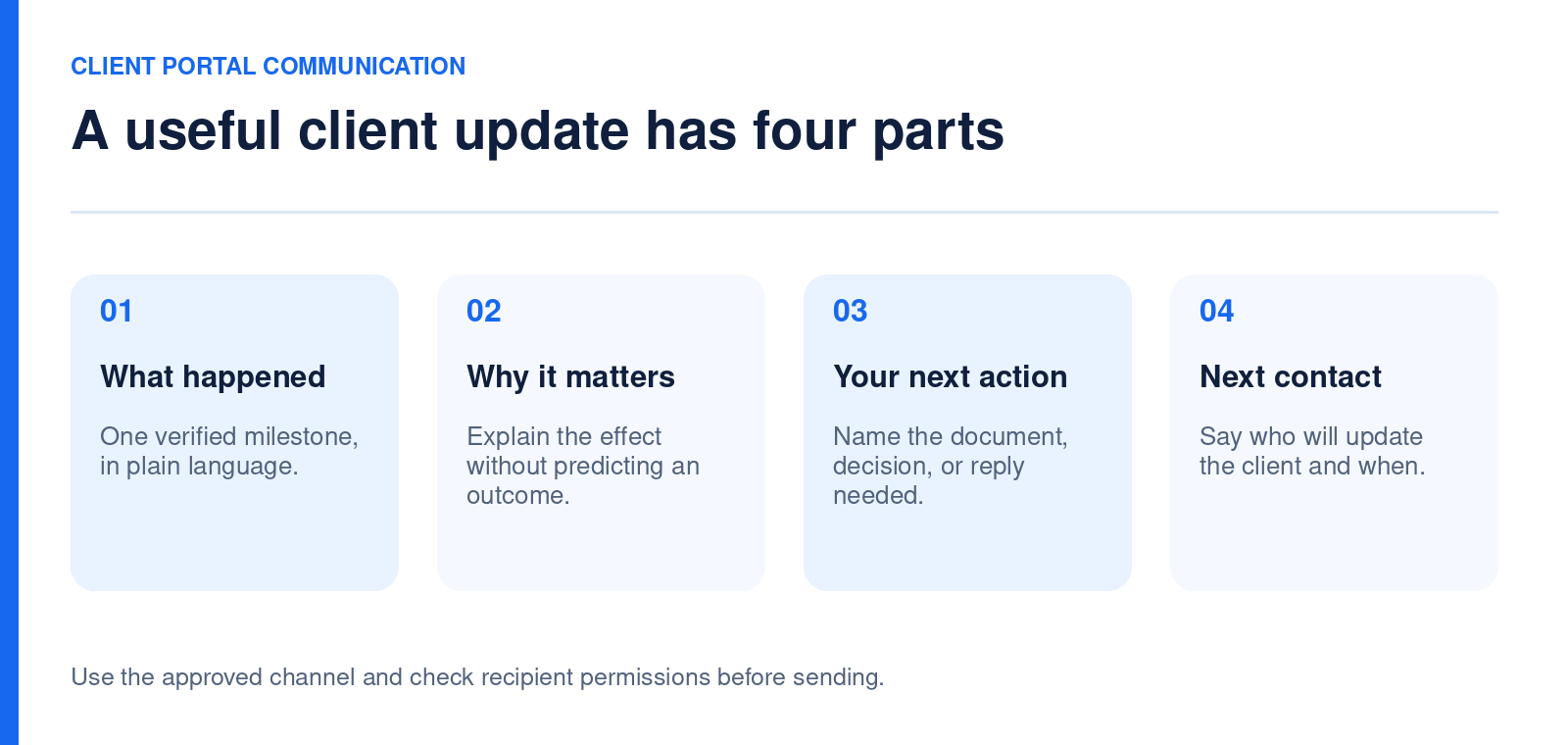
Templates are most useful as a quality check, not as a robotic substitute for a personal message. A milestone update could follow this structure:
Subject: Update on your matter
What changed: We received the requested records today.
What we are doing: The responsible attorney is reviewing them before the next discussion.
What we need from you: Please upload the missing statement by Friday, if available.
Next update: We expect to contact you after our review next week. If anything urgent changes, call the office.
Adapt the wording to the matter. Do not use a template that suggests an attorney has reviewed information when that has not happened. For multilingual clients, confirm that the intended language and translated content are appropriate. Lawcus describes multilingual portal support on its client portal page, but the firm remains responsible for the accuracy of client communications.
Make onboarding an actual handoff
At engagement, tell the client why the portal will make their work easier, then invite them while a staff member can help. Confirm they can sign in, find the matter, see the first message, and upload a test document if appropriate. Merely sending an invitation does not prove that access works. The Lawcus Help Center explains that inviting a user and sharing a specific matter are separate steps. Build both into the onboarding checklist.
Give clients a one-page guide with the portal URL, sign-in help, supported file types and size limits if applicable, message expectations, and an alternate route for urgent issues. If a client cannot use the portal comfortably, maintain an accessible communication option. Do not let a software preference become a barrier to representation.
Build a safe document-exchange routine
Every request for documents should say what is needed, why it is needed, when it is due, and whether originals must be retained. Group requests by task rather than sending a dozen scattered messages. Ask for a clear file name and date when the client submits more than one version. A staff member should confirm the upload arrived in the right matter and that the attorney can review it.
Set a review rule for sensitive uploads. A client might submit medical, financial, or identity records that require narrower access and different retention. The portal can be a transport and collaboration layer; it does not make every upload necessary or every internal user an appropriate recipient. The document automation pillar covers repeatable document workflows, while the portal policy should define the human review and sharing boundary.
Choose a communication cadence by matter type
A transactional matter may have predictable milestones. Litigation can involve long pauses and sudden deadlines. An estate-planning engagement might need a draft review and signing checklist. Define a minimum update cadence for each common matter type, then allow the responsible attorney to adjust it. Consider the client’s preferred channel, language, accessibility, and safety. In sensitive matters, even a notification preview may reveal information to someone who can see the client’s device.
Keep the cadence visible in the matter-opening process. The client intake checklist explains the transition from accepted lead to operational matter; the portal promise belongs in that transition. A new matter with no communication owner should be considered incomplete, even if all documents are filed correctly.
Measure whether communication is improving
Track a few measures that can change a decision: invitation acceptance, first successful login, percentage of matters with an update in the agreed interval, unanswered messages beyond the service standard, document-request completion, and reasons clients revert to email or phone. Segment by matter type and by clients who need additional support. A high login rate is not success if clients still do not understand the next step.
Review a sample of messages for clarity, not just speed. Ask whether each update states the client’s action and the next contact point. A monthly review of recurring questions may show that the invitation email, FAQ, or status terminology needs rewriting. The Lawcus reporting pillar is a relevant starting point for firmwide visibility, but confirm which portal-specific measures your configuration can actually report before promising a dashboard.
Close the loop at the end of a matter
A closing message should confirm what work is complete, provide the final approved documents, identify remaining actions or deadlines, explain records and retention, and give the client a contact route for future questions. Then review portal access and permissions according to firm policy. Do not leave stale access open merely because the matter is marked closed internally.
The best portal plan is deliberately simple: a clear promise, a responsible owner, approved sharing rules, predictable updates, and a tested closeout. Those elements help the product deliver a better client experience without requiring the firm to send more messages than it can support.
Frequently asked questions
Should a portal replace phone calls?
No. Use the portal for routine collaboration and records, and define a phone route for urgent or sensitive conversations. Let client needs and applicable duties determine the channel.
What should a law firm share first?
Start with the engagement materials, an introductory message, the next action, and a simple document request if needed. Add matter information only after checking accuracy and permissions.
How often should clients receive updates?
Choose a cadence that fits the matter and can be kept reliably. Combine milestone updates with a quiet-period check-in, and tell clients when the next update is expected.
Can a firm automate portal invitations?
Some administrative invitations can be automated under a defined trigger. The Lawcus workflow guide describes an invitation action. Confirm recipient, matter permissions, and the client communication policy before turning it on.
Categories
Automation BlogsBilling & Accounting BlogsGeneral PracticeMarketing BlogsNews & UpdatesPractice Management BlogsRecent Posts
Client Portal Communication for Law Firms
How to Choose Legal Billing Software for a Law Firm
Introducing Billing and Task Insights in Lawcus

Law Firm KPIs: The Metrics Every Managing Partner Should Track
LEDES Billing for Law Firms: Formats, UTBMS Codes and Setup
Practice Management
Automation
Client Intake & CRM
Billing & Accounting
Practice Area
Compare
Resources
Lawcus Inc.
4445 Eastgate Mall, Suite 200,
San Diego, CA 92121


