-

-
-
Product

Solutions
One app, all things legal

Compare
-
-
-

 Gmail
 Microsoft 365
 Wisetime
 Dropbox
 Zapier
 Quickbooks
 vs CosmoLex
 vs PracticePanther
 vs AbacusNext
 vs Caret Legal
 vs Clio
 vs MyCase
 vs Smokeball
 vs Filevine


SEO Checklist for Blog Posts: A Practical Guide for Law Firms
23rd November 2026
A useful legal blog post starts with a question a prospective client actually asks. Before publishing it, make sure the page answers that question clearly, reflects the law and your firm’s process, and gives the reader a sensible next step. After it goes live, check that Google can find the page and look at the queries that bring it into search results.
This blog SEO checklist follows a post from brief to publication and review. Use it for a new article or when updating an existing one. The worked example follows a small estate planning firm preparing a checklist for a first consultation.
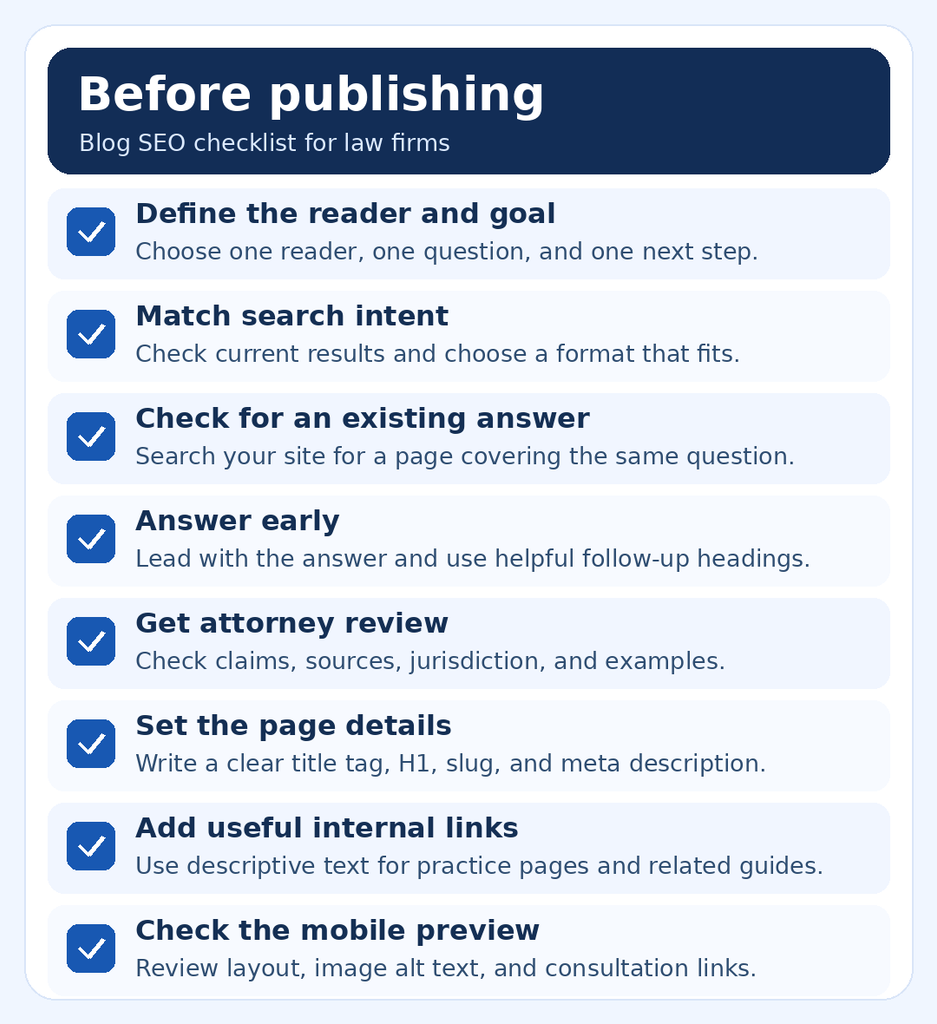
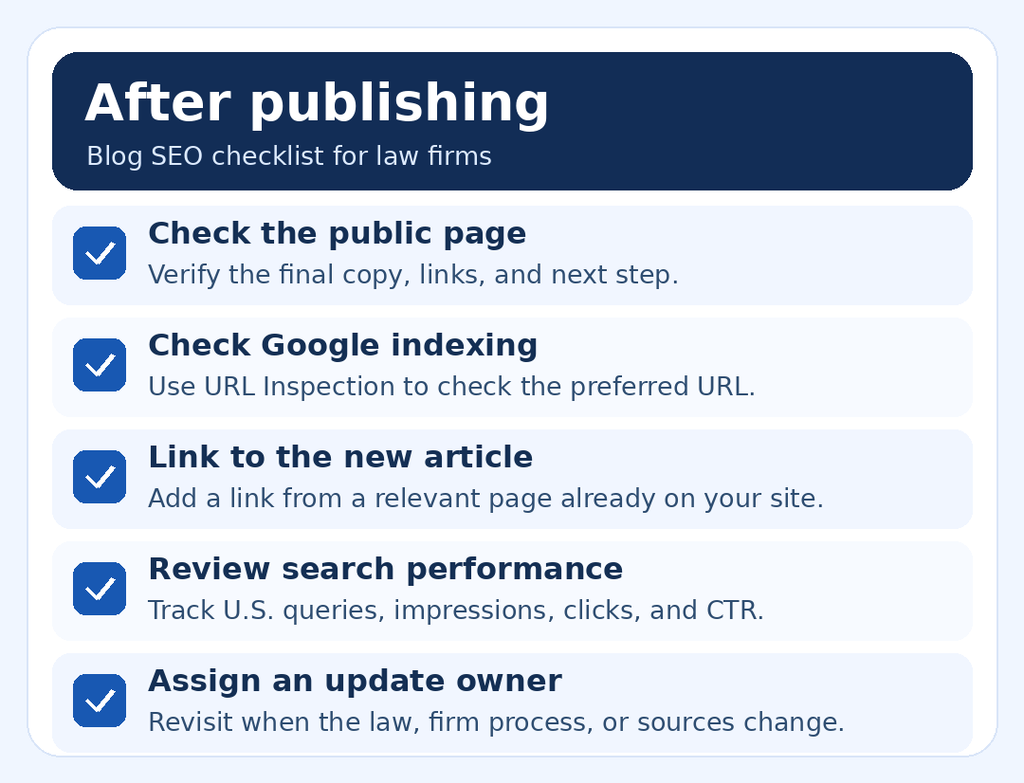
Copyable blog SEO checklist
Before publishing
After publishing
Before you write, choose the search question
Start with a question the reader could type into Google. A broad topic like estate planning can refer to choosing a lawyer, understanding a document, organizing records, or preparing for an appointment. A question like “what to bring to an estate planning consultation” gives the writer a clear job. The reader should finish with a list they can use before the meeting.
Look at what Google returns for the phrase. If the results are mostly preparation checklists, a checklist is a sensible format. If they’re mostly local service pages, the searcher may be looking for a firm rather than an article. Record the target query and the result format in the brief so the person writing and the person reviewing agree on what the page needs to do.
Use intake questions and Search Console together where possible. Intake tells you what people still need explained. Existing query data can show which related questions your website is already appearing for. A new topic can still be useful when you have limited keyword data, particularly if it addresses a recurring point of confusion. Record the basis for the choice so you can judge it against the right goal after publishing.
Check your own site before you draft. If a current post already answers the question well, improve that page and link to it from the relevant service page. If your estate planning service page describes what the firm offers but says little about how to prepare for a meeting, a separate preparation checklist can serve readers at that point in their decision. The Lawcus guide to content marketing for law firms covers how to choose topics around the client journey.
Build the article around the reader’s next decision
Give a direct answer in the introduction. Then turn the follow-up questions into headings. For the consultation example, the sections might cover what information to gather, which decisions to think about, and how to handle missing documents. That structure lets a reader with an appointment tomorrow jump straight to the part they need.
Make the answer specific enough to use. “Bring relevant documents” gives the reader another question to solve. “Make a list of any estate planning documents you already have, with the approximate date of each and where it is kept” gives them a task they can complete. Ask your reviewing attorney to supply the useful details that reflect your firm’s actual process.
Assign the attorney review before scheduling the post. Confirm the source and jurisdiction for legal claims, check any examples, and make sure descriptions of what a reader can expect match the firm’s process. If an example can teach the same point without using client information, write it as an illustrative scenario. Decide who owns future review and what should trigger an update, such as a new rule, a changed intake procedure, or an outdated source.
Review what the post will look like in search
Give the page one clear main heading and a descriptive title tag. Both should explain what the reader will get. Use a short, readable slug for a new article, and check that the publishing tool hasn’t added an unnecessary suffix. Google’s SEO Starter Guide explains how descriptive titles and URLs help readers understand what a page covers.
Write a meta description that states the practical benefit in plain language. For a preparation checklist, say what the reader can gather or decide before they go. Google may pull the search snippet from the page itself or use the meta description when it describes the page well, so give the introduction the same care. See Google’s guidance on search snippets.
Use an image if it helps readers understand or use the post. A consultation-preparation graphic should reinforce the list in the article, with the essential information also available as readable text. Give informative images descriptive alt text. Preview the page on a phone and check that headings, images, and the final call to action can be read without zooming or scrolling sideways.
Connect the post to the rest of your website
Choose links that answer the reader’s next likely question. Someone preparing for an estate planning meeting might need to learn what the firm’s estate planning service covers or how to schedule an appointment. Link phrases such as “estate planning services” or “schedule an estate planning consultation” when those pages genuinely serve that next step. Google’s guidance on descriptive internal links explains how link text sets expectations for the destination.
Add a useful link in the other direction, too. A short paragraph on the estate planning service page about the first appointment can point to the preparation checklist. Someone who starts on the service page gets the supporting information at the right time. Someone who starts on the blog can continue to the service page when they are ready.
Test the primary call to action on a phone. If it leads to a form or appointment page, make sure the destination handles the type of inquiry the post describes. Where the article mentions sensitive information, explain what the reader can gather and how the firm prefers to receive it.
Worked example: An estate planning consultation checklist
This example illustrates the decisions a writer and reviewing attorney could record in the brief. Adapt the application details to your firm.
- Reader and goal. Help someone preparing for a first estate planning consultation leave with a short list of documents, people, and decisions to discuss.
- Candidate query. What to bring to an estate planning consultation.
- Title and H1. What to Bring to an Estate Planning Consultation.
- Proposed slug. /what-to-bring-to-estate-planning-consultation/
- Meta description. Prepare for your first estate planning consultation with a checklist of documents, people, and decisions to discuss with your attorney.
- Opening answer. Bring a list of any existing estate planning documents, the people you want to discuss, a broad inventory of assets, and your questions. Ask the firm how it prefers to receive sensitive records.
- Internal links and next step. Link to the firm’s estate planning service page and consultation information. Add a link back to the checklist from the service page’s first-appointment section.
- Review owner. Have the attorney who handles initial appointments review the preparation steps and confirm the document-sharing instructions.
After publishing, check what Google and readers see
Open the public URL first. Check that it loads, displays the approved copy, and links to the intended pages. In Search Console, use URL Inspection to see what Google knows about the preferred URL. If a new article hasn’t appeared, inspect the live URL to look for access or indexing issues. A live test checks whether the page can be accessed for indexing. Indexing status is shown separately. See Google’s URL Inspection guide.
Once enough data has accumulated, open the Search Console Performance report and filter to the article URL. Use the same country and date scope when comparing results. Review clicks, impressions, CTR, and the queries that matter to the article. For small sites, look at enough complete weeks to see a pattern before acting on a handful of impressions. Record the publication date and any major changes so you can compare periods fairly.
Use the evidence to choose one change. If the article earns impressions for a relevant question that it barely answers, add a clear answer in the right section. If the right query is already bringing impressions but few clicks, inspect the result title and snippet alongside the other results before changing the title. If inquiries arrive but repeatedly turn out to be outside the firm’s scope, make the next step and practice-area details clearer.
For site-wide SEO priorities beyond individual articles, see the Lawcus guide to SEO for law firms.
Categories
Automation BlogsBilling & Accounting BlogsGeneral PracticeMarketing BlogsNews & UpdatesPractice Management BlogsRecent Posts
SEO Checklist for Blog Posts: A Practical Guide for Law Firms
How to Reduce Unbilled Time at Your Law Firm
Google Ads for Lawyers: How to Plan Your First Lead-Generation Campaign

Feature Release: October 2026

AI Client Communication for Law Firms: A Human Review Workflow
Practice Management
Automation
Client Intake & CRM
Billing & Accounting
Practice Area
Compare
Resources
Lawcus Inc.
4445 Eastgate Mall, Suite 200,
San Diego, CA 92121


