-

-
-
Product

Solutions
One app, all things legal

-
-
-


 Gmail
Gmail  Microsoft 365
  Wisetime
  Dropbox
  Zapier
  Quickbooks
  vs CosmoLex
  vs PracticePanther
  vs AbacusNext
  vs Caret Legal
  vs Clio
  vs MyCase


Law Firm Client Intake Checklist: From Inquiry to Engagement
28th September 2026
A strong client intake process does more than collect a name, email address and case summary. It helps a law firm respond consistently, identify urgent issues, screen for conflicts, determine fit, set expectations and move an accepted client into an organized matter.
This law firm client intake checklist covers the complete journey from the first inquiry to a signed engagement and clean matter handoff. It is designed as an operational starting point for U.S. law firms. Adapt every step to your jurisdiction, practice area, firm policies and professional obligations.
The intake process at a glance
Capture the inquiry → acknowledge and route it → collect conflict-check information → assess fit and capacity → schedule the consultation → decide whether to engage → complete the agreement and payment steps → open the matter or close the inquiry.
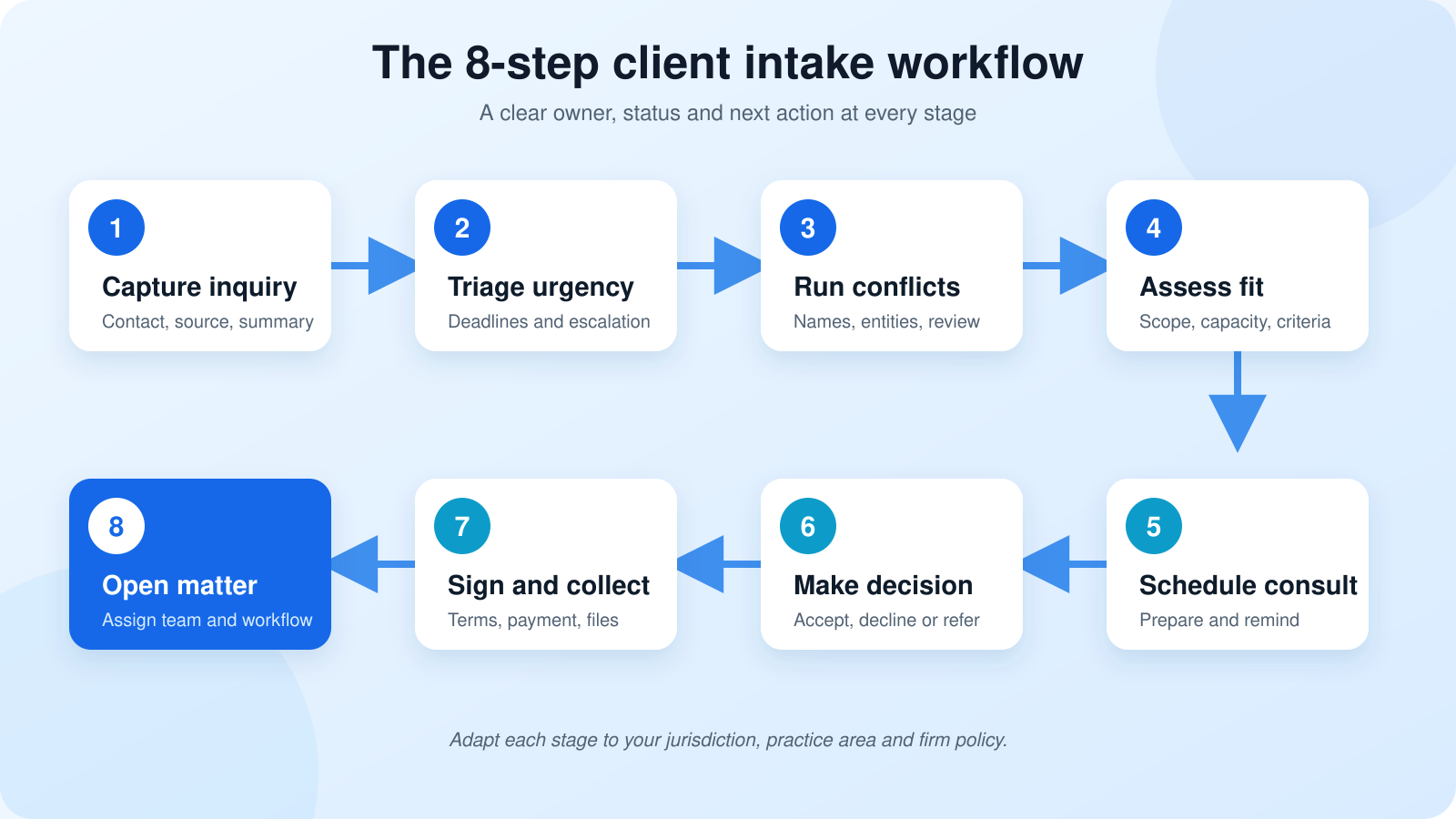
Quick law firm client intake checklist
Use this condensed version as the starting point for your firm’s standard operating procedure:
- Record the inquiry: Capture contact information, referral source, practice area, a short matter summary and the prospect’s preferred contact method.
- Identify urgency: Flag possible deadlines, hearings, limitation periods, emergencies or time-sensitive evidence for immediate attorney review.
- Assign ownership: Give one person responsibility for the next response and record when it is due.
- Send an acknowledgement: Confirm receipt without implying that the firm has accepted the matter.
- Gather conflict-check names: Collect the prospective client, adverse parties, related people, entities and known witnesses required by firm policy.
- Complete the conflict process: Route the information through the firm’s attorney-controlled conflict review before requesting unnecessary substantive detail.
- Assess fit and capacity: Review practice area, jurisdiction, matter type, timing, economics, workload and any firm-specific acceptance criteria.
- Schedule the consultation: Provide a clear booking route, confirmation, preparation instructions and reminders.
- Prepare for the meeting: Organize the intake answers, relevant documents, objectives, questions and possible deadlines.
- Record the engagement decision: Mark the inquiry as accepted, declined, referred, awaiting information or requiring further review.
- Document the terms: Send the appropriate engagement agreement, fee information, scope and client responsibilities for review and signature.
- Complete payment steps: Collect the required retainer or payment details using the firm’s approved process.
- Open the matter: Convert approved information into the matter record, assign the team and launch the correct tasks and workflows.
- Close declined inquiries: Send the firm-approved non-engagement communication, document the outcome and apply the correct retention process.
1. Define where intake begins and ends
Before creating a form, define the stages your firm means by inquiry, intake, consultation, engagement and matter opening. These terms are often used interchangeably, which creates unclear handoffs.
A useful process makes the boundaries explicit:
- An inquiry is a request for information or possible representation.
- Intake captures the minimum information needed to route, screen and evaluate the inquiry.
- A consultation is a scheduled discussion governed by the firm’s policies and applicable professional obligations.
- Engagement occurs only after the firm completes its acceptance process and the required terms are agreed.
- Matter opening creates the operational record, team, tasks, documents, billing information and communication plan.
The distinction matters because someone who consults with a lawyer about possible representation may be a prospective client. The ABA Model Rule 1.18 on duties to prospective clients addresses information learned during that stage, including when no client-lawyer relationship follows.
2. Capture the first inquiry without over-collecting
The first form or call should gather enough information to identify the person, route the request and begin the approved screening process. It should not automatically become a detailed case interview.
Recommended first-contact fields
- Full name and preferred name
- Email address and phone number
- Preferred contact method and safe times to communicate
- General practice area or matter category
- Short, neutral description of the request
- Known court dates, filing dates or urgent deadlines
- How the person heard about the firm
- Preferred language and accessibility needs
- Names needed for preliminary conflict screening
- Consent or acknowledgement language required by firm policy
Do not treat a website submission as acceptance of representation. Use clear language explaining that submitting information does not create an attorney-client relationship and that the firm must complete its review before agreeing to act.
Lawcus users can create and share structured intake forms, map responses to lead information and use a submission to start the next approved workflow. See how to collect and organize client information with Lawcus intake forms.
3. Acknowledge, triage and assign the inquiry
An automated acknowledgement can confirm receipt, explain the next step and set a realistic response expectation. It should not give legal advice or imply that the matter has been accepted.
Every inquiry should also receive:
- An owner: The person responsible for the next action.
- A status: New, urgent review, conflict review, awaiting information, consultation scheduled, declined or another defined stage.
- A due time: A specific follow-up deadline based on the firm’s service standard.
- An escalation route: Instructions for potential deadlines, emergencies and sensitive issues.
Standardization is important. The ABA’s intake guidance recommends documented policies for calls, emails, forms, consultations and in-person visits so staff understand what happens next.
4. Gather the right information for conflict review
A conflict check is not simply a search for the prospective client’s name. The information required depends on the practice area and firm policy, but may include:
- Current and former names of the prospective client
- Adverse parties and opposing counsel
- Related companies, subsidiaries, owners and decision-makers
- Spouses, partners, family members or beneficiaries
- Insurers, employers and other materially involved organizations
- Known witnesses or other participants when relevant
- Existing or former clients connected to the matter
Record that the authorized review is pending or complete, but keep sensitive conflict analysis in the firm’s approved system. The ABA’s conflict-checking guide discusses why a maintained, systematic process is essential.
Important: Software can collect names, preserve a record and route a review. The decision about whether a conflict exists, whether consent is possible and whether the firm may proceed remains a professional judgment governed by applicable rules and firm policy.
5. Screen for fit, capacity and next steps
Passing a conflict check does not automatically mean the firm should accept the matter. Create a consistent qualification framework so intake staff know what they can determine and what requires attorney review.
Fit and capacity questions
- Does the matter fall within an approved practice area?
- Is the relevant jurisdiction one in which the firm can act?
- Does the firm have capacity for the expected timeline and workload?
- Are the matter economics consistent with firm policy?
- Does the issue require a specialist or referral?
- Are there communication, language or accessibility needs to plan for?
- Is additional information required before scheduling a consultation?
Use structured criteria to improve consistency, but avoid turning the decision into an uncontrolled automated score. Automation should support the review, not replace professional judgment.
6. Schedule and prepare the consultation
When the inquiry is ready for a consultation, make booking simple and preparation clear. A good confirmation should include:
- Date, time, time zone and meeting format
- Attorney or team member conducting the consultation
- How to reschedule or cancel
- Documents the prospect should provide in advance
- Any consultation fee and approved payment instructions
- Accessibility, interpreter or technology instructions
- A reminder that representation has not yet been accepted, where appropriate
Use legal appointment scheduling software to offer approved time slots, prevent double booking and automate confirmations and reminders. The intake record should remain connected to the appointment so the attorney can review the prospect’s answers before the meeting.
7. Record the engagement decision clearly
After review or consultation, every inquiry needs a documented outcome. Recommended statuses include:
- Accepted, agreement pending
- Accepted, payment or retainer pending
- Additional information required
- Further attorney review required
- Referred to another provider
- Declined
- Prospect did not proceed
- Unable to contact
If the firm proceeds, document the scope, responsibilities and fee arrangement using the correct template. ABA Model Rule 1.5 addresses fee arrangements, including circumstances in which written agreements are required. Firms should apply the rules governing their jurisdiction and matter type.
Legal e-signature software can reduce the delay between approval and signature while keeping the document connected to the intake record. The signed agreement can then trigger internal tasks, payment steps or matter creation.
8. Collect documents and information securely
Avoid using a general email thread as the only place for sensitive intake documents. Provide an approved method for uploads and explain what the prospect should send.
Common document categories include:
- Notices, pleadings, orders and correspondence
- Contracts, policies and signed agreements
- Photographs, videos and other evidence
- Financial records, invoices and payment documents
- Medical, employment or property records where relevant
- Identity and authorization documents required by firm policy
Use a secure legal client portal for approved document exchange, messages and client tasks. Request only what is needed at that stage and apply the firm’s access, retention and deletion policies.
9. Convert the accepted lead into an operational matter
Once the firm’s acceptance conditions are satisfied, the client record should move into practice management without unnecessary re-entry. The matter-opening checklist should confirm:
- Client and related-contact information
- Matter name, type, description and responsible attorney
- Practice area, jurisdiction and important dates
- Engagement agreement and applicable disclosures
- Billing arrangement, rates, retainer and trust information
- Team members, permissions and communication preferences
- Documents and intake answers that should transfer
- Initial tasks, deadlines, appointments and matter stages
- Referral source and marketing attribution
- Welcome message and client-portal invitation
A connected system should preserve context from inquiry to matter. Read the comparison of law firm CRM versus practice management software to see where disconnected tools create duplicate work.
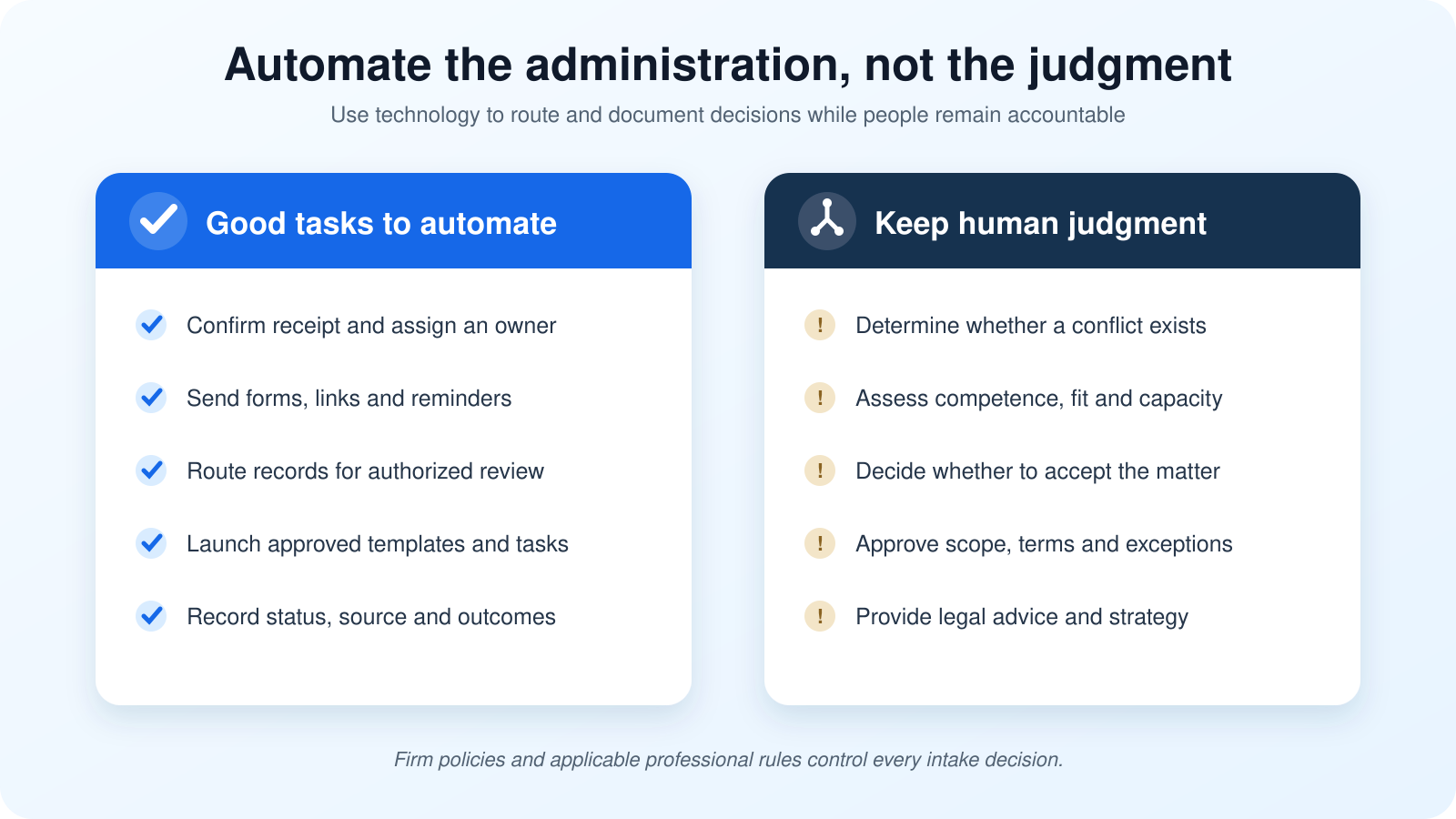
What to automate and what to keep under human control
Legal workflow automation software is most useful when it removes repetitive administration and makes ownership visible.
Good candidates for automation
- Creating a lead record from an approved form
- Sending receipt confirmations and scheduling links
- Assigning intake tasks and due dates
- Sending appointment reminders
- Requesting missing administrative information
- Routing completed forms for review
- Sending an approved agreement template
- Creating a matter after an authorized trigger
- Launching approved matter templates and welcome steps
- Recording source, status and conversion metrics
Decisions that require human judgment
- Determining whether a conflict exists
- Deciding whether a matter is within the firm’s competence and capacity
- Assessing urgency, strategy or legal merit
- Determining whether the firm will accept representation
- Approving the scope and terms of engagement
- Giving legal advice
- Approving exceptions, waivers or referrals
Practice-area additions to the checklist
A universal checklist should provide the core workflow, then branch into practice-area-specific questions and document requests.
Personal injury
- Date and location of the incident
- Known deadlines and prior claims
- Insurance information
- Medical providers and treatment status
- Police reports, photographs and witness details
Family law
- Names of spouses, partners and children
- Existing orders, hearings and counsel
- Immediate safety or custody concerns
- Key financial and property information
- Related proceedings or prior representation
Estate planning
- Family and beneficiary information
- Existing estate documents
- General asset and ownership categories
- Fiduciary preferences
- Business interests and planning objectives
Business and commercial matters
- Legal entity names and ownership
- Related companies and decision-makers
- Contracting parties and counterparties
- Material dates and transaction stage
- Existing advisers or counsel
Client intake metrics worth tracking
A checklist improves consistency. Metrics show where the process still breaks down.
- Time to first response: Time between inquiry and meaningful acknowledgement or contact.
- Form completion rate: Percentage of requested intake forms completed.
- Consultation booking rate: Qualified inquiries that schedule a consultation.
- Consultation show rate: Scheduled consultations that occur.
- Time to engagement: Time from first inquiry to completed agreement.
- Qualified-to-engaged conversion: Qualified prospects who become clients.
- Source quality: Retained matters by referral or marketing source, not only inquiry volume.
- Decline and loss reasons: Conflict, fit, capacity, price, no response, competitor or another defined reason.
- Incomplete handoffs: Matters opened with missing agreements, billing information, documents or task ownership.
Review these measures by practice area, source and responsible team. Avoid using one overall conversion rate to judge inquiries that differ substantially in fit or value.
Common intake mistakes to avoid
- Collecting too much too soon. Long forms increase abandonment and may invite unnecessary sensitive disclosure before review.
- Leaving inquiries unassigned. A shared inbox is not ownership.
- Allowing automation to imply engagement. Templates and confirmations should reflect the firm’s approved language.
- Running incomplete conflict searches. The prospect’s name alone may not identify relevant relationships.
- Keeping intake in disconnected systems. Re-entering names, notes and documents creates delay and inconsistency.
- Failing to close declined inquiries. A documented outcome and approved communication prevent ambiguity.
- Tracking volume instead of quality. More inquiries do not automatically mean more suitable matters.
- Automating professional decisions. Technology should route and document judgment, not replace it.
How Lawcus supports a connected intake process
Lawcus legal client intake software connects intake forms, lead pipelines, scheduling, communications, e-signatures, workflows and matter management.
A firm can capture an inquiry, assign follow-up, send the right questionnaire, schedule a consultation, record the engagement decision and move approved information into an operational matter. From there, legal task management, documents, billing and client communication can follow the firm’s established process.
The goal is not to automate every decision. It is to create a reliable system in which the right person receives the right information and knows the next approved action.
Frequently asked questions
What should a law firm client intake checklist include?
It should cover inquiry capture, urgency triage, ownership, conflict-check information, fit and capacity review, consultation scheduling, engagement decisions, agreements, payment requirements, document collection, matter opening and declined-inquiry closeout.
What information should a law firm collect on its first intake form?
Start with contact details, preferred communication, matter category, a short summary, potential deadlines, referral source and the names required for initial conflict screening. Collect more detailed information only when the firm’s approved process calls for it.
Is an intake form the same as an engagement agreement?
No. An intake form collects information for screening and evaluation. An engagement agreement documents the accepted scope and terms of representation. Firms should use clear language so a prospect understands the difference.
Can a law firm automate client intake?
Law firms can automate administrative steps such as confirmations, task assignment, forms, reminders, scheduling, document routing and authorized matter creation. Conflict decisions, matter acceptance, scope approval and legal advice should remain under appropriate human control.
How often should a law firm review its intake checklist?
Review it whenever the firm changes practice areas, forms, staffing, software or professional requirements. A periodic review of response times, conversion stages, incomplete handoffs and decline reasons can identify where the checklist needs revision.
Build a repeatable path from inquiry to matter
A useful intake checklist makes the process easier for prospects and more reliable for the firm. It captures only what is needed, protects professional judgment, keeps ownership visible and prevents accepted matters from beginning with missing information.
To evaluate the broader system behind intake, explore the CRM and practice-management comparison or review the legal practice management software buyer’s guide.
This article provides general operational information and is not legal, ethics, security or compliance advice. Law firms should adapt the checklist with qualified professionals and the rules applicable to their jurisdiction and work.
Categories
Automation BlogsBilling & Accounting BlogsGeneral PracticeMarketing BlogsNews & UpdatesPractice Management BlogsRecent Posts
LEDES Billing for Law Firms: Formats, UTBMS Codes and Setup
Law Firm Client Intake Checklist: From Inquiry to Engagement

Law Firm CRM vs Practice Management Software: What Does Your Firm Actually Need?

Feature Release: August 2026
The Lawcus Mobile App Is Here: Manage Legal Work From Anywhere
Practice Management
Automation
Client Intake & CRM
Billing & Accounting
Practice Area
Compare
Resources
Lawcus Inc.
4445 Eastgate Mall, Suite 200,
San Diego, CA 92121


