-

-
-
Product

What's New?

Majority of our clients have saved upto 8 hours every week, by automating iterative and difficult processes.
Learn more
Solutions
One app, all things legal

-
-
-
 Gmail
Gmail  Microsoft 365
  Wisetime
  Dropbox
  Zapier
  Quickbooks
  vs CosmoLex
  vs PracticePanther
  vs AbacusNext
  vs Caret Legal
  vs Clio
  vs MyCase


Feature Release: June 2026
5th June 2026
Your June feature round-up is here. This month, Lawcus introduced a powerful set of updates designed to give your firm more clarity, control, and confidence across everyday work.
From personalized dashboards and new Insight Cards to Time Insights, Task Kanban Views, Global Search improvements, billing enhancements, document updates, reporting improvements, and client collaboration fixes, every update is built around one goal: helping your firm work smarter from one connected workspace.
Whether you are reviewing firm performance, managing tasks, tracking time, searching for information, preparing invoices, or collaborating with clients, these June updates make it easier to stay organized, spot what needs attention, and keep work moving forward.
Major Feature Releases
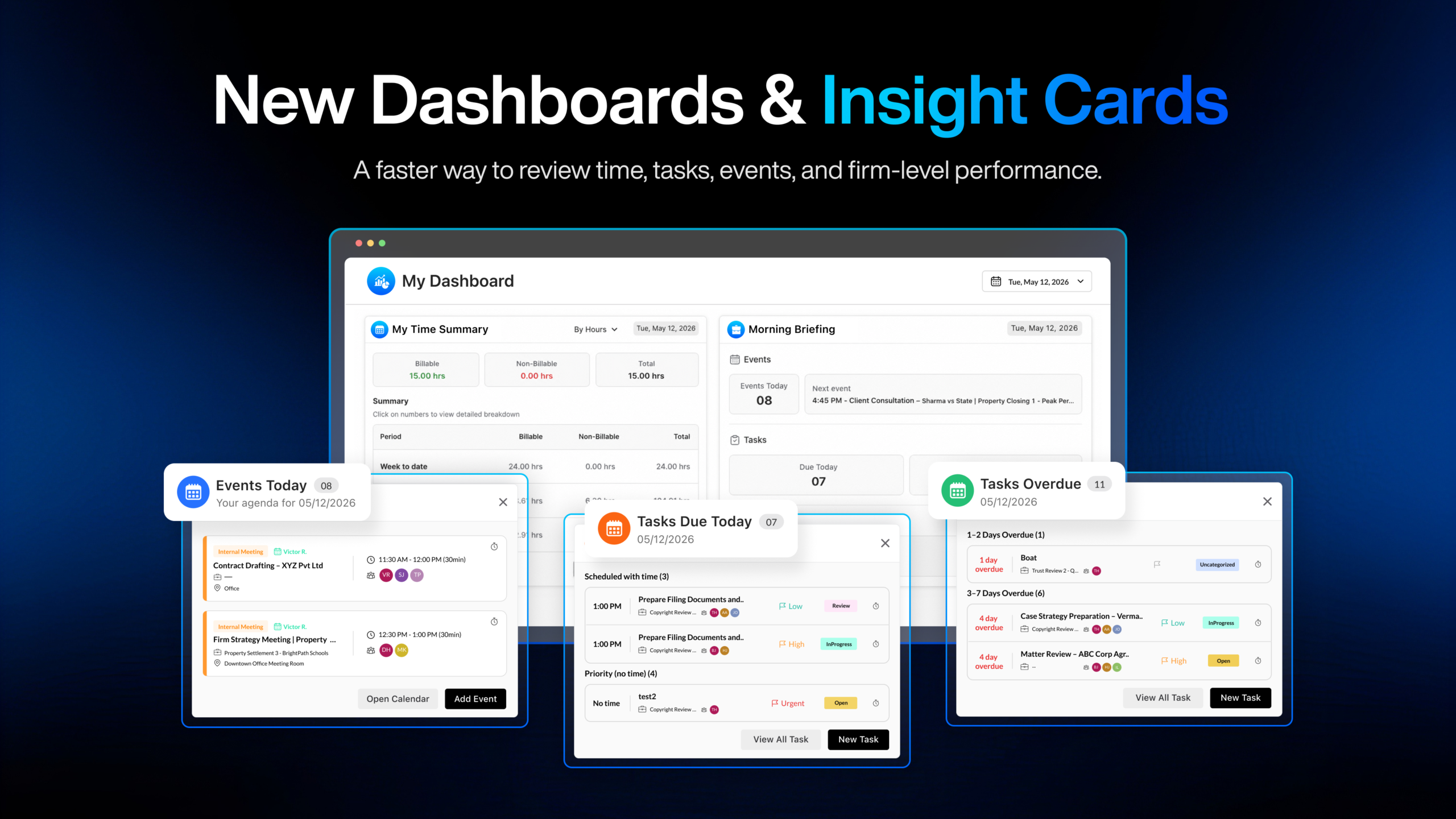
Personalized Dashboards and Insight Cards
Lawcus now offers a more personalized dashboard experience with new Insight Cards for both My Dashboard and Firm Dashboard.
With this update, users can quickly review their own time, tasks, events, priorities, and daily work from My Dashboard, while firm owners and administrators can view firm-level performance from Firm Dashboard.
This gives every user a clearer place to start, review what needs attention, and take action without needing to run multiple reports.
Learn More
Time Insights and New Integrations
We launched Time Insights, the first release in the new Lawcus Insights suite.
Time Insights helps firms review time, billing, utilization, WIP, and performance trends directly inside Lawcus through All Insights and My Insights.
With this release, firms can better understand how time is being recorded, where billable work stands, what remains uninvoiced, and how performance is trending across the team.
Learn More
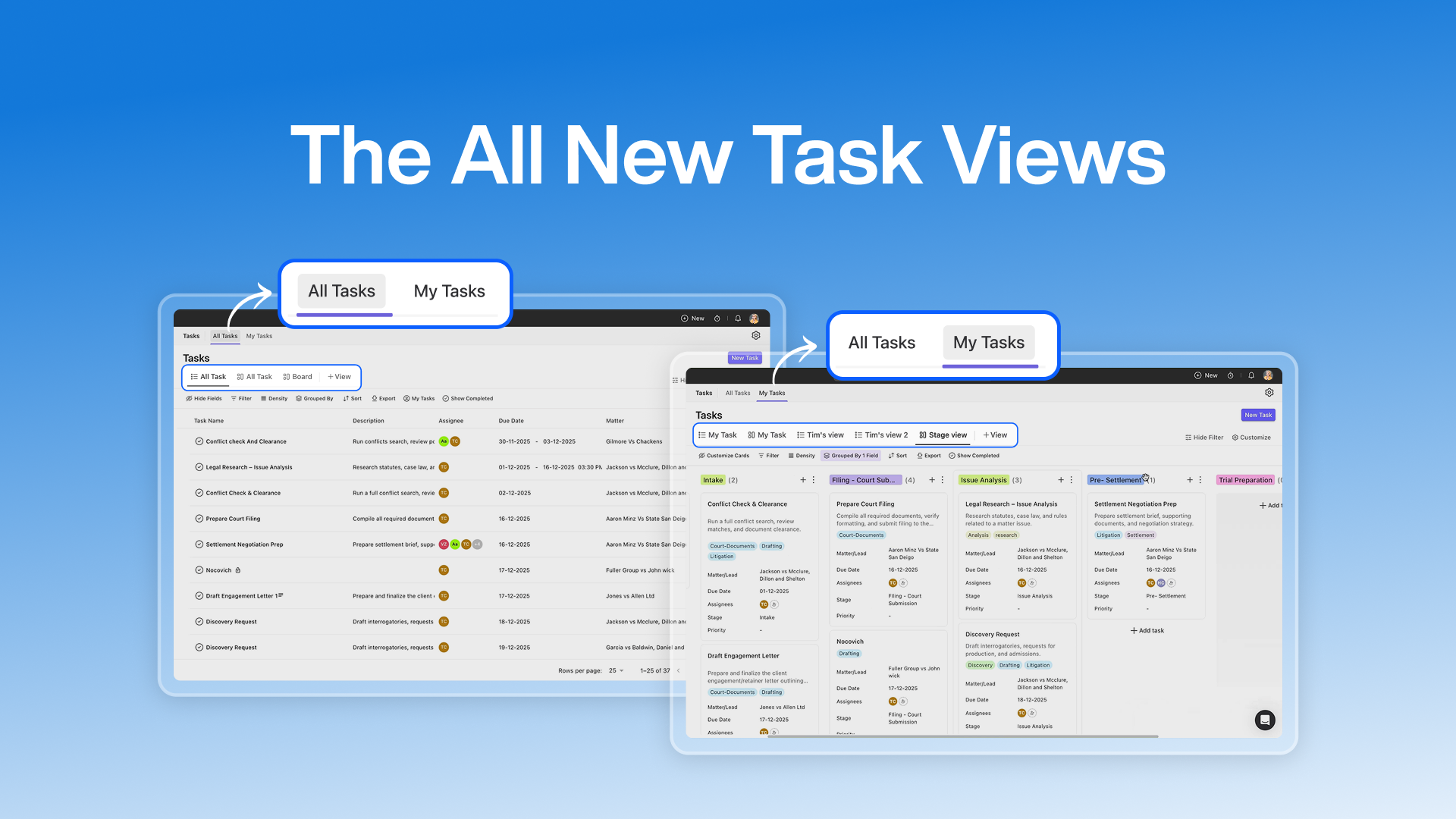
New Task Kanban Views
Lawcus now gives firms a clearer visual way to manage tasks with new Kanban Views.
Tasks can now be grouped by Overdue, Today, Tomorrow, Upcoming, and No Due Date, making it easier for users to understand what needs attention first.
Firms can also create custom Kanban views by practice area, matter type, team, or other workflows, giving each team a more flexible way to manage work.
Profile Picture Upload Enhancement
Users can now upload a profile picture and crop it directly inside Lawcus before saving.
This makes it easier to get the right fit without resizing the image outside the application.
Description Field Special Character Issue Fixed
We fixed an issue where Description fields on forms were not handling special characters correctly.
Description fields now support special characters properly, ensuring text is saved and displayed as expected.
Enhancements
Stay Updated with the Latest Lawcus Releases
A new Release icon is now available in the top navigation bar.
Users can quickly access the three most recent product updates, video walkthroughs, full release notes, and the complete release history directly from Lawcus.
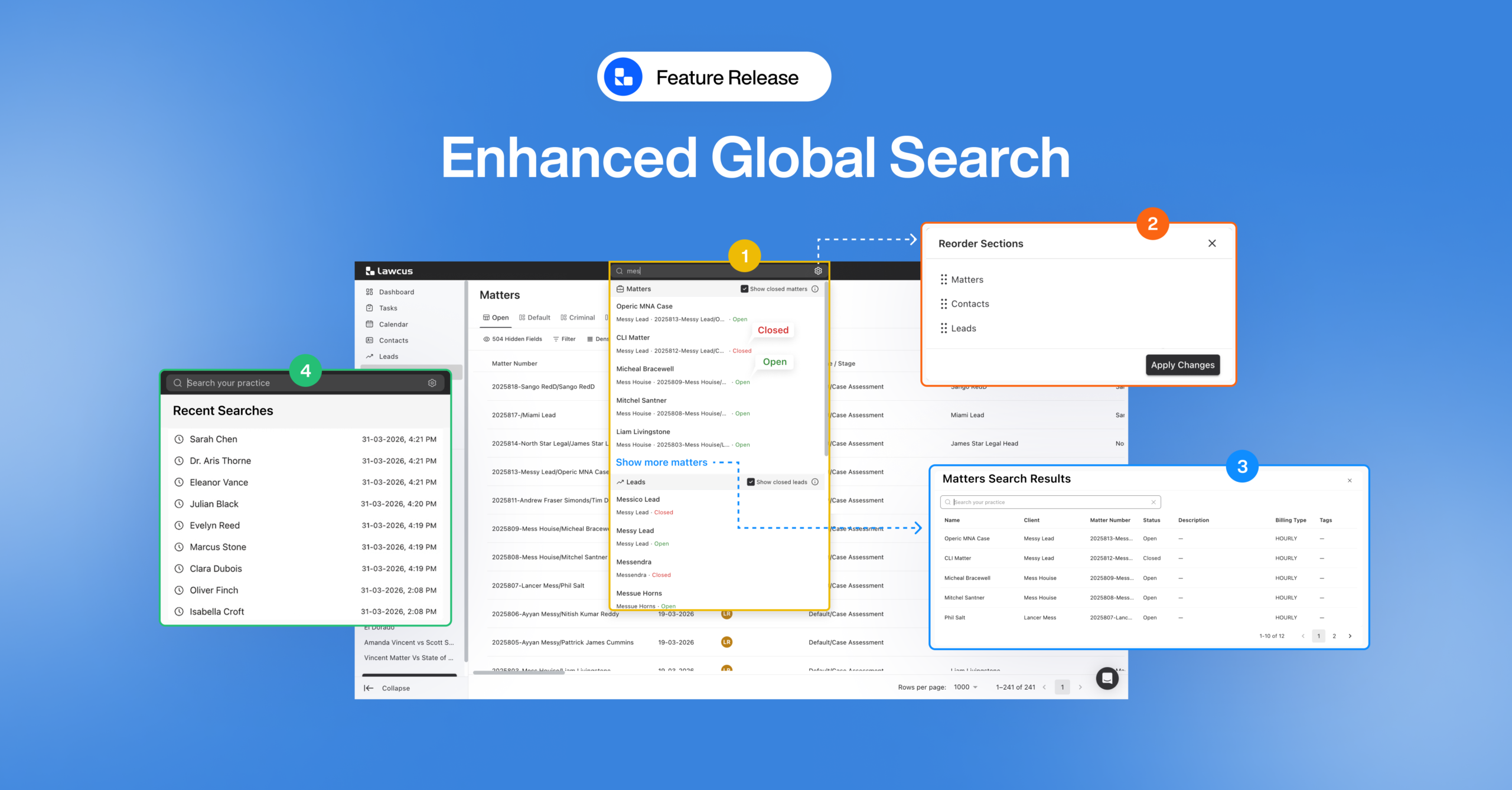
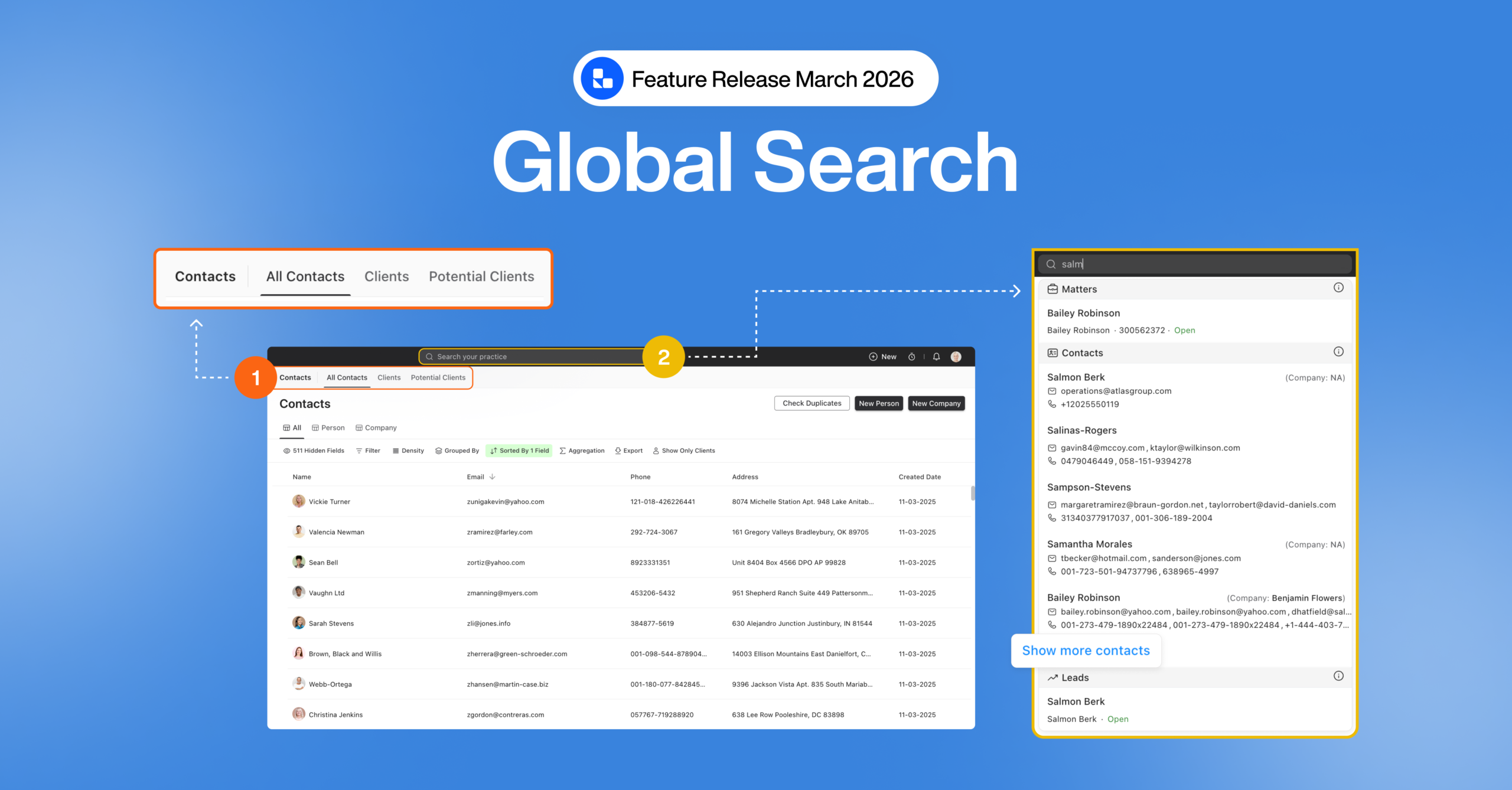
Global Search Improvements
We improved Global Search to make it clearer, faster, and more flexible.
Potential Clients are now searchable, results show more helpful context, users can customize result order, recent searches are available, and keyboard navigation has been improved.
Intake Form Submission Export Enhancement
We added the ability to include intake form response data in the Full Backup export.
This allows firms to access, retain, and review submitted intake information outside Lawcus more easily.
Confido Surcharge Settings Enhancement
We improved how Confido surcharge settings are applied to Lawcus invoices and payment links.
Lawcus now respects surcharge settings more accurately, helping improve billing consistency and payment accuracy.
Client Portal Secure Message Visibility Issue Fixed
We fixed an issue where secure messages sent to a contact were not appearing in the Client Portal even when the matter was shared with that contact.
Secure messages now appear correctly for portal users on shared matters.
User Settings Interface Improved
We improved the User Settings interface with a cleaner and more user-friendly layout.
This makes it easier for users to find and update their personal preferences inside Lawcus.
Merge Tags in Email Template Subject Lines
Email templates now support merge tags in the subject line.
Firms can now automatically include relevant information, such as matter details, without manually editing the subject each time.
File Upload Handling Improved in Expense and Intake Forms
We improved file upload handling in Expense and Intake forms.
Users now see clearer upload progress, and intake forms better handle incomplete or interrupted file uploads to prevent forms from getting stuck.
Created and Modified Tracking Added
We added Created Date, Created By, Modified Date, and Modified By fields for Invoices, Matters, and Leads.
These fields help firms review creation and update details directly from list views and related reports, including invoice list views and the Invoice Summary Report.
Improved List Views with MUI Grid
We updated key list views across Contacts, Matters, and Leads with the new MUI Grid experience.
This creates a cleaner and more consistent way to view, organize, and manage related records and billing activity.
Bug Fixes
Matters
Matter Stage Sorting Issue Fixed
Users can now sort matter stages correctly in Kanban view.
Matter Numbering Issue Fixed
We fixed an issue where the Client Index and Matter Index were not following the numbering format set by the firm. Lawcus will now correctly respect configured formats such as 001 or 0001, including leading zeros, so that numbers are generated exactly as expected.
Matter Board Upcoming Task Date Issue Fixed
We fixed an issue where deleting a task from a matter did not always clear the upcoming task date shown in the Matter Board view. The Matter Board now updates correctly and only shows dates from active tasks.
Matter Activities Action Button Visibility Issue Fixed
We fixed an issue where action buttons such as Add Flat Fee, Add Time Entry, and Add Expense were not displaying correctly on larger screens. These buttons now display properly across supported screen sizes.
Company Contact Name Display Issue Fixed
We fixed an issue where company-type contact names could disappear and show as N/A when linked as a matter client. Company-type matter clients now display correctly.
Leads and Intake Forms
Lead Default Contact Custom Fields Issue Fixed
We fixed an issue where default Contact custom fields were not appearing in the Lead section while creating a lead with a default matter. With this fix, default Contact custom fields now appear correctly in the Lead section along with Matter custom fields.
Intake Form Lead Information Overwrite Issue Fixed
We fixed an issue where submitting an intake form with a Client Info question type could remove existing information from a lead. Existing lead details are now preserved, and intake responses update only the applicable fields.
Lead Intake Contact Custom Field Mapping Issue Fixed
We fixed an issue where Contact custom fields were not getting updated from intake form responses on leads. Intake responses now correctly update mapped Contact custom fields.
Scheduler Lead Phone Country Code Enhancement
We improved how phone numbers are handled when creating leads from scheduler appointments. If the phone number does not include a country code, Lawcus will now use the country code from the firm settings.
Billing, Invoicing, Payments, and Trust
Client Portal Matter Invoices Visibility Issue Fixed
We fixed an issue where invoices generated for a matter were not appearing under the Invoices tab in the Client Portal. Matter-related invoices now display correctly for portal users.
Bulk Invoice Duplicate Number Issue Fixed
We fixed an issue where duplicate invoice numbers could be created when generating invoices in bulk from the Billable Clients tab. Duplicate invoice number validation now works consistently for both manual and bulk invoice creation.
Payment Link Invoice PDF Trust Balance Issue Fixed
We fixed an issue where invoice PDFs downloaded from the payment link did not match PDFs downloaded directly from Lawcus when trust balance display was enabled. PDFs from both locations now follow the same invoice display settings.
Payment Page Invoice PDF Timekeeper Display Issue Fixed
We fixed an issue where the Timekeeper value showed as N/A when downloading an invoice PDF from the payment page link. The payment page invoice PDF now shows the correct Timekeeper information.
New Payment Client Selection Error Fixed
We fixed an issue where adding a new payment from the + New icon could show an incorrect validation error after selecting a client. The payment flow now validates the payment amount correctly based on selected invoices and available balance.
Invoice Activity Value Display Issue Fixed
We fixed an issue where activity values displayed differently between the Activities page and Invoice pages. Activity values now display consistently while respecting the firm’s rounding settings.
Trust Request Formatting Issue Fixed
We fixed an issue where trust request formatting could appear disturbed when using the Simple or Pro invoice themes. Trust requests now display with proper formatting across these themes.
Invoice Approval Email Merge Tags Issue Fixed
We fixed an issue where merge tags were not resolving correctly in email templates used during the invoice approval process. Supported merge tags now load the correct related data instead of appearing as plain text.
Expenses
Expense Attachments Visibility Issue Fixed
We fixed an issue where attachments added to expenses were not visible from the Matter Expenses tab. The attachments column is now available again, allowing users to quickly view and access expense-related receipts or documents from the matter.
Expense Total Calculation Issue Fixed
We fixed an issue where expense totals could display incorrect decimal values after calculation. Expense totals are now rounded and displayed correctly in the expected currency format.
Tasks, Calendar, and Events
Deleted Task Calendar Visibility Issue Fixed
We fixed an issue where deleted tasks were still appearing in the Calendar and Today’s Agenda. Deleted tasks are now removed correctly from all related views.
Custom Role Task Assignment Issue Fixed
We fixed an issue where users with custom roles could not assign tasks to other team members when creating tasks from the Matter Tasks section. Task assignment permissions now work consistently across Matter Tasks and the main Tasks tab.
Guest List Visibility Issue Fixed
We fixed an issue where the Guest tab only showed client names and did not list Lawcus users. The Guest tab now shows both client contacts and Lawcus users across Phone Logs, Interactions, and Events.
Documents and Files
Matter File Move Folder Visibility Issue Fixed
We fixed an issue where folders created inside the Matter Files section were not appearing when users tried to move a file. Users can now select the correct destination folder when moving files within a matter.
Document Template Generated File Issue Fixed
We fixed an issue where documents generated from certain document templates could not be opened after download. Generated matter documents now download correctly and remain readable.
Client Portal
Client Portal Matter Invoices Visibility Issue Fixed
We fixed an issue where invoices generated for a matter were not appearing under the Invoices tab in the Client Portal. Matter-related invoices now display correctly for portal users.
Client Portal Matter Board View Visibility Issue Fixed
We fixed an issue where the Matter Board View was not visible in the Client Portal even when access was enabled. The Board View now appears correctly for portal users with the required access.
Reports and Analytics
Report Expand and Collapse Issue Fixed
We fixed an issue where expand and collapse actions on reports were not working consistently. Report sections now open and close reliably.
Revenue by Matters Report Aggregation Issue Fixed
We fixed an issue where the Revenue by Matters report could break when all aggregations were removed. Users can now update or remove aggregations without breaking the report.
Invoice Summary Report Subtotal Column Added
We added a new Subtotal column to the Invoice Summary Report. The Subtotal column shows the pre-tax amount, while the Total column continues to show the invoice amount including tax.
Global Search and Workflows
Deleted Lead Global Search Issue Fixed
We fixed an issue where deleted leads could still appear as contacts in Global Search. Deleted leads are now removed correctly from search results.
Workflow Search Deleted Matter Loading Issue Fixed
We fixed an issue where workflow search could remain stuck on loading when a related matter had been deleted. Deleted matter references now show as N/A instead of causing the search to continue loading.
Integrations
QuickBooks Sync Icon Visibility Issue Fixed
We fixed an issue where the QuickBooks icon was not appearing on the Matter Invoices page for invoices already synced to QuickBooks. Synced invoices now show the QuickBooks icon correctly.
QuickBooks Sync Support for Zero-Rate Invoice Entries
We have improved QuickBooks sync handling for invoices that include entries with a 0.00 hourly rate. Firms can now include zero-rate billable entries on invoices without needing manual workarounds.
User Removal Integration Cleanup Issue Fixed
We fixed an issue where a removed user’s integrations could remain connected to the team. Team-related integrations are now cleaned up when a user is removed, preventing unnecessary broken integration notifications.
Time and Activities
Timer Time Entry Non-Billable Rate Issue Fixed
We fixed an issue where time entries created using the timer did not update the rate correctly when later assigned to a Non-Billable matter. The rate and amount now update correctly to 0.00 when applicable.
Invoice Activity Value Display Issue Fixed
We fixed an issue where activity values displayed differently between the Activities page and Invoice pages. Activity values now display consistently while respecting the firm’s rounding settings.
Settings, Plans, and Permissions
Plan Access Enhancements
We have updated feature availability across Lawcus plans. Bulk Invoice and Write-Off are now available on all plans, eSign limits have been updated by plan, and LEDES Billing and Invoice Approval Workflow are now available on Growth plans and above.
Tax Settings Clear Option Issue Fixed
We fixed an issue where clearing one tax in Settings could also remove other saved taxes. Clearing a tax now only removes the selected tax entry.
Built to Help Your Firm Work Smarter
This month’s updates are designed to give your firm more clarity, better control, and a smoother experience across everyday workflows.
Whether you are reviewing time performance, managing tasks, searching across records, handling billing, working with client portal users, or keeping data organized, Lawcus continues to improve the way your firm works.
Categories
Automation BlogsBilling & Accounting BlogsGeneral PracticeMarketing BlogsNews & UpdatesPractice Management BlogsRecent Posts
Feature Release: June 2026
Feature Release: Personalized Dashboards and Insight Cards in Lawcus
The All New Tasks Experience: Built for How Law Firms Work
Feature Release: Enhanced Global Search
Feature Release: Global Search Improvements
Practice Management
Automation
Client Intake & CRM
Billing & Accounting
Practice Area
Compare
Resources
Lawcus Inc.
4445 Eastgate Mall, Suite 200,
San Diego, CA 92121


