-

-
-
Product

Solutions
One app, all things legal

Compare
-
-
-


 Gmail
Gmail  Microsoft 365
  Wisetime
  Dropbox
  Zapier
  Quickbooks
  vs CosmoLex
  vs PracticePanther
  vs AbacusNext
  vs Caret Legal
  vs Clio
  vs MyCase
  vs Smokeball
  vs Filevine


Feature Release: Personalized Dashboards and Insight Cards in Lawcus
28th May 2026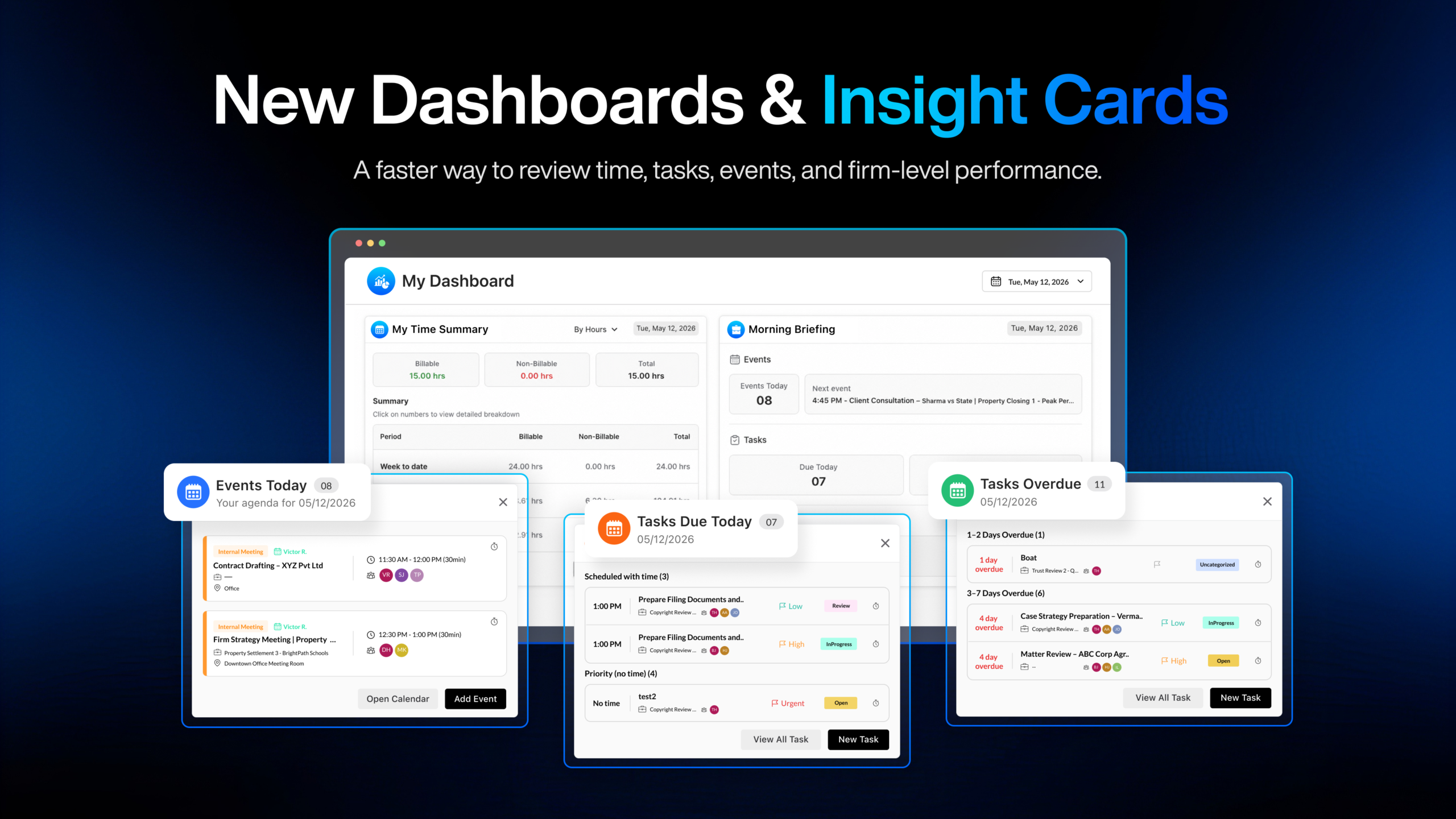
A productive legal workday starts with clarity.
Between client meetings, court deadlines, overdue tasks, missing time, and firm-wide performance tracking, legal teams often have to move between multiple pages just to understand what needs attention.
With the new Lawcus Dashboards and Insight Cards, important information is now brought directly to each user — in one personalized, interactive view.
This release introduces a more useful dashboard experience for both individual users and firm leadership, helping every user quickly understand their day, review key time data, and take action without needing to run reports or ask someone else for updates.
Two Dashboard Experiences with Built-In Insight Cards
Lawcus now offers two dashboard experiences designed for different roles within the firm.
My Dashboard is available to every user and shows information based on the logged-in user. It helps each timekeeper quickly review their own work, time, tasks, events, and daily priorities.
This dashboard includes the first user-level Insight Cards:
- My Time Summary
- Morning Briefing.
Firm Dashboard is available to Firm Owners and Administrators. It gives leadership a firm-level view of performance across the team, helping admins understand how time is being recorded, where billable work is happening, and how the firm is progressing.
This dashboard includes the first firm-level Insight Card:
- Firm Time Summary.
These cards are not just static summaries. They are interactive and drillable, helping users move from information to action faster.
Rea
Read all details about the feature here!
My Time Summary: A Clear View of Your Own Time
The My Time Summary card gives each user a clear and quick view of their recorded time. Instead of running a report or checking multiple screens, timekeepers can immediately see how much time they have entered for the selected date.
At the top of the card, you can review their time broken down into Billable Time, Non-Billable Time, and Total Time. This helps you understand not only how much work you have recorded, but also how much of that time contributes to billable work.
Lawcus also shows the same summary across important time periods, including Week to Date, Month to Date, and Year to Date. This gives users a broader view of their progress, helping them quickly understand how their current day, week, month, and year are shaping up.
You can choose to view the card By Hours or By Amount, making it easy to review both recorded time and its billing value.
Drill Into the Details Behind Every Number
The numbers in My Time Summary are interactive. Users can click any total, such as Month to Date, to open a detailed breakdown of the time entries behind that number.
You can choose to change the breakdown to view the data by Time Entry, by Matter, or by Client.
For example, when viewing the data By Client, Lawcus shows billable time, non-billable time, and total time for each client. This helps users understand where their time is being spent and what is contributing to the overall totals.
Firm Time Summary: Firm-Wide Time Visibility for Admins
With Firm Time Summary, Firm Owners and Administrators can now get a clear firm-wide view of recorded time directly from the Firm Dashboard. Instead of looking at time one user at a time, admins can see how time is being captured across the entire team and understand the bigger picture of firm performance.
The card can be viewed By Hours or By Amount, giving leadership the flexibility to review both the volume of work being recorded and the billing value behind that work. The numbers are also interactive, so admins can move from a high-level total into the details behind it whenever they need more context.
At the firm level, Lawcus gives admins more ways to analyze time across the business, including by time entry, client, matter, originating timekeeper, responsible timekeeper, timekeeper, title, practice area, and matter type or pipeline.
Admins can quickly compare performance, identify patterns, review billable and non-billable work, and make better decisions with real-time visibility into the firm’s time activity.
Morning Briefing: Start the Day With What Needs Attention
The Morning Briefing card is designed to help each user begin the day with a clear view of what matters most. Instead of checking the calendar, task list, and time entries separately, users can now see key daily information in one place.
Morning Briefing brings together three important areas:
- Events
- Tasks
- Time Target
Events Today
At the top of the card, Lawcus shows the user’s events for the day, along with the next upcoming event.
When a user clicks Events Today, Lawcus opens a detailed list of today’s events, grouped by event type such as client meetings, internal meetings, and personal events.
Each event includes useful information such as the event title, matter or client context, time, duration, attendees, and location.
If the user clicks the next event, Lawcus opens the detailed information for that specific event, helping them quickly prepare for what is coming up.
Tasks Due Today
The Morning Briefing card also shows how many tasks are due today. When users click Tasks Due Today, Lawcus opens a focused task list for the day.
Tasks with a scheduled time are grouped separately, helping users see what needs to happen at a specific time. Tasks without a specific time are also shown clearly, so they do not get missed.
Each task includes helpful context such as the task name, matter information, assigned users, priority, and status. Users can complete tasks, add time, view all tasks, or create a new task directly from the card.
Overdue Tasks
Overdue work should not disappear just because the due date has passed. That is why Morning Briefing also highlights overdue tasks.
When users click into overdue tasks, Lawcus opens a detailed list grouped by how long the tasks have been overdue.
This helps users quickly understand what is slightly behind and what needs more urgent attention. Users can complete overdue tasks, add time, open the full task list, or create a new task from the same workflow.
Time Target
The Time Target section helps users identify missing time from the last working day.
For example, if a user was expected to record eight hours but only recorded part of that time, Lawcus clearly shows the missing time and allows the user to add time directly from the card.
This helps users capture time while the work is still fresh, improving billing accuracy and reducing missed time.
Customize the Dashboard Around the Way You Work
Lawcus dashboards are not meant to be one-size-fits-all. Each user may want to see different information depending on their role, responsibilities, and daily workflow.
On My Dashboard, users can click Customize, then Add to open the Insights library. The library is organized by module, making it easier to find available charts and cards.
Cards provide quick summaries and action-focused information, while charts give a deeper visual view of trends and performance.
The same customization experience is also available for the Firm Dashboard, allowing Firm Owners and Administrators to build a dashboard around the information they want to track, such as time performance, productivity, billing activity, matter activity, and more as the Insights library continues to grow.
A More Personal, Actionable Dashboard Experience
With the new Dashboards and Insight Cards, Lawcus gives users a smarter way to start the day and stay informed. Timekeepers can review their own time, tasks, events, and missing time from one place.
Firm Owners and Administrators can monitor firm-wide time performance and drill into the details behind the numbers. Most importantly, these dashboards are interactive. Users can move from summary to detail, complete tasks, add time, open events, review breakdowns, and take action directly from the dashboard.
Lawcus is making dashboards more personal, more useful, and more connected to the way legal teams actually work. We shall continue to build tools that help law firms operate more efficiently, collaborate more effectively, and deliver exceptional client experiences. If you’d like to see how Lawcus can support your firm’s operations, you can explore our website, watch feature walkthroughs on our YouTube channel, or book a free demo with our team. If you have any questions, our team at Lawcus is always happy to help.
Categories
Automation BlogsBilling & Accounting BlogsGeneral PracticeMarketing BlogsNews & UpdatesPractice Management BlogsRecent Posts
Introducing Matter Access Center: Manage Matter Participants and Access in One Place

Client Portal Communication for Law Firms
How to Choose Legal Billing Software for a Law Firm
Introducing Billing and Task Insights in Lawcus

Law Firm KPIs: The Metrics Every Managing Partner Should Track
Practice Management
Automation
Client Intake & CRM
Billing & Accounting
Practice Area
Compare
Resources
Lawcus Inc.
4445 Eastgate Mall, Suite 200,
San Diego, CA 92121


