-

-
-
Product

Solutions
One app, all things legal

Compare
-
-
-


 Gmail
Gmail  Microsoft 365
  Wisetime
  Dropbox
  Zapier
  Quickbooks
  vs CosmoLex
  vs PracticePanther
  vs AbacusNext
  vs Caret Legal
  vs Clio
  vs MyCase
  vs Smokeball
  vs Filevine


AI Client Communication for Law Firms: A Human Review Workflow
30th October 2026
AI can help a law firm draft a client email, but a lawyer or responsible team member must still decide what it says and whether it should be sent. A plausible sentence can be wrong about a deadline, reveal more than the recipient should know, or imply an outcome no one can promise. The useful workflow begins with an approved communication purpose and ends with human verification, recipient checks, and a record in the matter.
This guide focuses on AI-assisted client communications in U.S. law firms: status updates, document requests, meeting follow-ups, and plain-language explanations of next steps. It complements the Lawcus Nova AI page, which describes assistance with composing emails, text messages, notes, matter descriptions, and task descriptions. This article does not assume that a generated draft is legal advice or that every planned AI feature is currently available. Verify the capabilities and data terms of the specific tool before using it on client matters.
Choose a narrow first use case
Begin with a low-risk, repeatable message whose facts are already confirmed. An appointment reminder, a request for a missing document, or a post-consultation outline of administrative next steps is easier to control than an explanation of an unsettled legal question. Classify messages by risk: routine logistics, matter status, legal analysis, and urgent advice. Require increasingly senior review as the risk rises; some messages should never be drafted by a general-purpose tool.
Write the intended outcome before generating text. Is the client being asked to upload a document, choose a meeting time, or understand why there is no new development? If staff cannot state the action in one sentence, an AI draft is likely to add words without adding clarity. The firm should retain a human-written option for clients who prefer a phone call, need accessibility support, or have a sensitive situation.
Set an approved data boundary
Before entering any matter information, check the tool’s contract, retention, access, subprocessors, and whether inputs may be used for model training. Follow the firm’s confidentiality and consent rules. ABA Formal Opinion 512 discusses lawyers’ duties when using generative AI, including competence, confidentiality, communication, supervision, candor, and fees. State and client requirements may differ. Do not paste a client’s file into an unapproved public tool simply because it can produce a polished message.
Use the minimum necessary facts. A routine scheduling message may need a meeting date and generic preparation instructions, not a full case history. Keep a list of approved tools and use cases, with a person responsible for reviewing changes to vendor terms. If a message requires sensitive details, decide whether a human should write it instead.
Build a fact sheet before the prompt
A draft should draw from verified matter facts, not memory or unreviewed notes. Create a short fact sheet with the correct recipient, matter identifier, confirmed event, date and time zone, the client’s action, the firm’s next action, approved attachments or links, and the owner who will send it. Separate confirmed facts from assumptions or questions. If a deadline is not confirmed, do not ask AI to “make the email sound confident.”
For example, a document request can contain: “Client: Jordan; approved channel: portal; needed item: signed tax return for 2024; purpose: attorney review; due date: Friday, October 30, 2026, 5 p.m. local time; contact: intake coordinator.” The firm should verify that date, recipient, and purpose before any draft is created. Do not use the example as a real deadline or universal template.
Use a prompt that forbids invention
A practical internal instruction might be: “Draft a concise, respectful client email using only the confirmed facts below. Explain the action in plain language. If information is missing, insert [CONFIRM] instead of guessing. Do not state legal conclusions, predict outcomes, or add deadlines. End with the firm’s approved contact route.” Add a tone and reading-level instruction if it serves the client, but avoid asking for artificial warmth that obscures the action.
Have the tool produce one draft, not a long chain of increasingly embellished versions. The purpose is to reduce first-draft friction. A reviewer should compare the output to the fact sheet line by line and discard text that cannot be supported. A polished message with one incorrect date is worse than an ordinary one that is accurate.
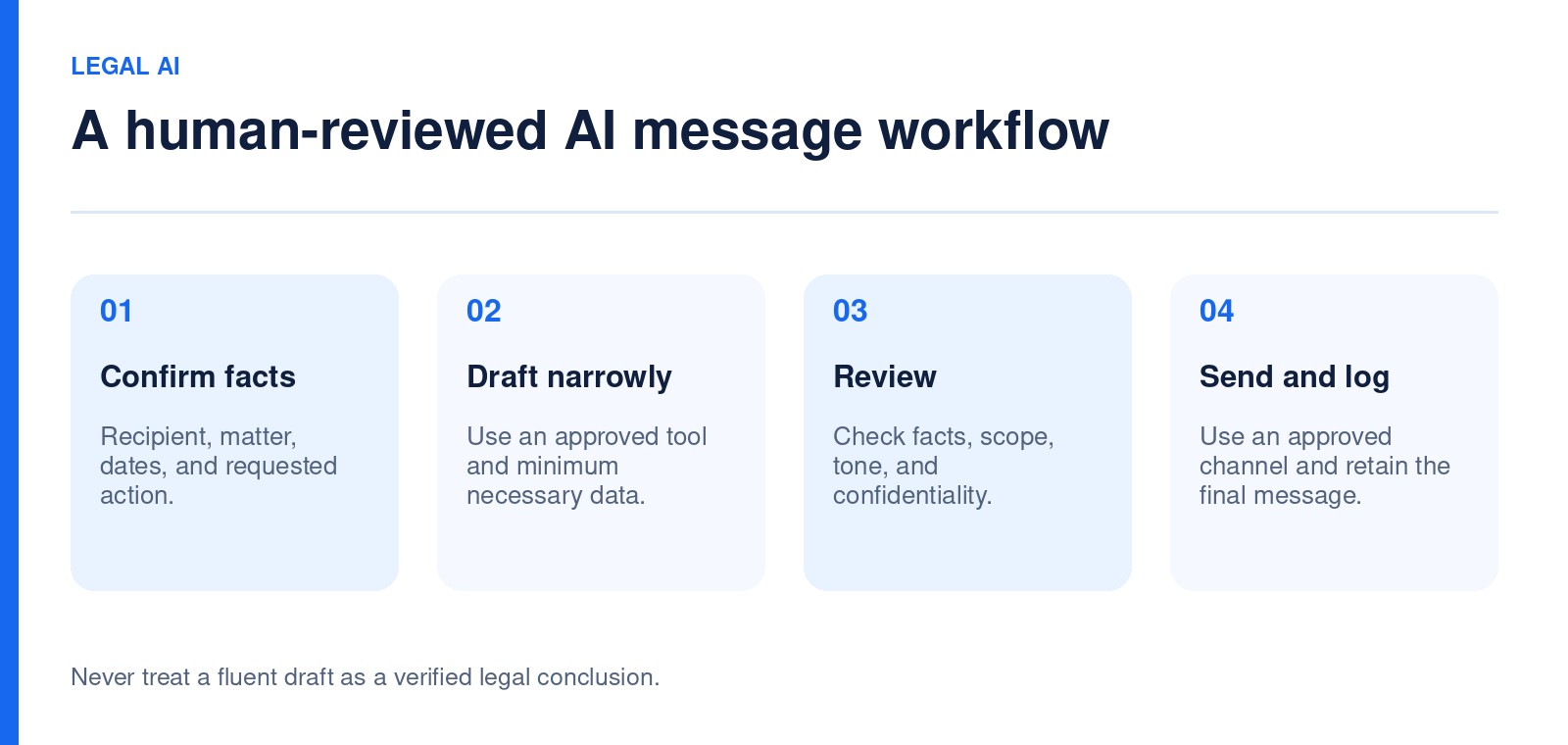
Run a five-part human review
- Facts: Check names, dates, amounts, status, deadlines, locations, and attachment descriptions against the matter record.
- Scope: Remove legal advice, predictions, or promises that were not authorized by the responsible lawyer.
- Confidentiality: Confirm the recipient and channel; inspect copied contacts, notification previews, and attached documents.
- Clarity: Put the action and next contact point near the top, and define unfamiliar legal terms.
- Record: Save the approved final message and the relevant decision in the matter under the firm’s retention policy.
Use a second reviewer for high-risk messages. A human sign-off is meaningful only when the reviewer has the underlying facts and enough time to evaluate them. Do not turn approval into a one-click ritual. In the client portal context, verify both the message and its intended visibility before sharing. A client communication plan can explain when a routine update belongs in the portal and when a call is more suitable.
Write for the person receiving the message
Clients want to know what happened, what it means for them, what they need to do, and when they will hear next. A useful subject line names the action: “Documents needed before our October meeting” is clearer than “Important update.” The body can open with one sentence of context, then a short list of actions and a contact route. Avoid unexplained acronyms, dense disclaimers, and confident language about uncertain proceedings.
Accessibility matters too. Use descriptive link text, readable formatting, and an alternative to a portal-only instruction when a client cannot use that channel. If translation is needed, have a qualified person review the message; a fluent-sounding AI translation can still alter a legal or practical meaning. Ask the client which communication method is safe, especially in matters involving personal safety or shared devices.
Connect the message to the matter workflow
AI drafting should not create a separate, untracked inbox. Define a trigger, owner, review, send, and follow-up step. A document-request message might begin after an attorney approves the request, route to staff for drafting, return to the attorney for high-risk review, and create a follow-up task if the client has not responded. The workflow automation and task management pillars are relevant to this operational handoff. Confirm the actual configuration before promising a particular automation.
Separate drafting from sending. A system that can prepare text should not automatically send legal advice or sensitive facts to a client without the required approval. Keep the approved final version attached to the matter so another team member can see what the client was told and when.
Evaluate the pilot with a small scorecard
Test a sample of routine messages for four weeks. Record minutes spent drafting and reviewing, factual corrections found, messages returned for clarification, client replies that show confusion, and any privacy or recipient errors. Compare to similar human-only messages, not to an idealized zero-review workflow. If drafting time falls but review and correction time rises, the process is not helping.
Sample messages across matter types and staff roles. Review the worst cases, not only an average. If a tool repeatedly invents a next step or softens an urgent instruction, change the use case or stop using it for that message type. A regular review can also reveal that the firm’s underlying matter notes need improvement; AI cannot reliably explain facts that the team has not recorded.
What to ask an AI vendor
Ask what data the tool receives, who can access inputs and outputs, how long they are retained, whether they train models, how the firm can delete or export them, and whether the product exposes citations or source context for generated statements. Test with fictional matters before using real client information. Request a demonstration of permissions, audit trails, and the point at which a draft becomes a sent message.
Lawcus currently describes Nova AI as a composition aid for emails, texts, and notes. Its public page also describes document summarization and generation as a future direction; do not procure on the assumption that those roadmap capabilities are live. For a broader comparison of products and criteria, see the existing legal AI tools guide, which surveys the wider market.
Frequently asked questions
Can AI send client updates automatically?
A firm should decide separately whether AI may draft and whether any message may be sent without review. Sensitive status, legal advice, deadlines, and recipient details call for human verification. Use a documented approval rule for each message type.
Should we put client files into an AI prompt?
Only after evaluating the specific tool’s data practices, the firm’s policies, applicable duties, and any client restrictions. Minimize information in any approved use. An unapproved public tool is an unsuitable default for confidential matter files.
How do we spot a misleading draft?
Compare every material statement to a verified fact sheet and source record. Watch for invented dates, missing qualifications, false certainty, and statements that subtly change the client’s required action.
What is a good first pilot?
Use routine administrative messages with confirmed facts and a named reviewer. Measure total staff time and corrections, then expand only if the process is both accurate and useful to clients.
Categories
Automation BlogsBilling & Accounting BlogsGeneral PracticeMarketing BlogsNews & UpdatesPractice Management BlogsRecent Posts
AI Client Communication for Law Firms: A Human Review Workflow

Law Firm Referral Marketing: Build a Relationship and Follow-Up System
Introducing Matter Access Center: Manage Matter Participants and Access in One Place

Client Portal Communication for Law Firms
How to Choose Legal Billing Software for a Law Firm
Practice Management
Automation
Client Intake & CRM
Billing & Accounting
Practice Area
Compare
Resources
Lawcus Inc.
4445 Eastgate Mall, Suite 200,
San Diego, CA 92121


