-

-
-
Product

Solutions
One app, all things legal

-
-
-


 Gmail
Gmail  Microsoft 365
  Wisetime
  Dropbox
  Zapier
  Quickbooks
  vs CosmoLex
  vs PracticePanther
  vs AbacusNext
  vs Caret Legal
  vs Clio
  vs MyCase


LEDES Billing for Law Firms: Formats, UTBMS Codes and Setup
28th September 2026
Corporate clients and insurance carriers often require more than a polished PDF invoice. They may ask outside counsel to submit billing data in a standardized electronic format, apply approved task codes, and follow client-specific validation rules. That is where LEDES billing and UTBMS codes enter the process.
For a law firm, the practical goal is not simply to generate a file. It is to produce an invoice that matches the client’s matter identifiers, coding rules, rates, dates, and descriptions closely enough to pass an e-billing system’s checks the first time.
This guide explains the main concepts, shows how the pieces fit together, and provides a practical setup process for firms using legal billing software.
What is LEDES billing?
LEDES stands for Legal Electronic Data Exchange Standard. The LEDES Oversight Committee develops and maintains open standards for exchanging billing and other legal data between law departments, law firms, and other legal service providers.
A LEDES file is a structured data file. Instead of presenting information mainly for a person to read, as a PDF invoice does, it arranges invoice and line-item data in defined fields that an e-billing platform can validate and process.
Depending on the format and client requirements, those fields can include the invoice number, client and matter identifiers, billing period, total, individual time or expense entries, task codes, activity codes, timekeeper details, rates, and descriptions.
LEDES does not decide what your firm may charge. The engagement agreement, outside counsel guidelines, approved rates, and client billing rules still control the commercial relationship. LEDES standardizes how the billing data is submitted.
Which LEDES format should a law firm use?
The safest answer is: use the exact format named in the client’s billing guidelines or e-billing portal. Do not choose a format only because it sounds newer or more detailed.
LEDES 1998B is one of the most widely recognized legal e-billing formats. The LEDES Oversight Committee‘s current format page provides the specification and a sample file. It uses a pipe-delimited structure with defined invoice and line-item fields.
LEDES 98BI extends the 1998B approach for international billing. Its specification includes fields intended to support global requirements such as currency and tax information. A firm should use it only when the client or platform requests that format.
Other LEDES formats and XML standards also exist. The correct choice depends on the client’s system, jurisdiction, billing arrangement, and data requirements. If the guidelines are unclear, ask the client’s billing administrator before submitting the first invoice.
What are UTBMS codes?
UTBMS stands for Uniform Task-Based Management System. The codes classify legal work so clients and firms can analyze spending by the type of work performed, not only by timekeeper or total amount.
The American Bar Association’s UTBMS toolkit explains that the system supports budgeting and billing by litigation task and includes code sets for litigation, bankruptcy, counseling, projects, workers’ compensation, mergers and acquisitions, criminal law, real estate, and other areas.
UTBMS commonly separates billing information into these code families:
- Task codes identify the matter phase or the legal task being handled, such as discovery or trial preparation.
- Activity codes describe the kind of work performed, such as researching, drafting, communicating, or appearing.
- Expense codes classify costs such as travel, filing fees, copying, or other approved disbursements.
- Timekeeper classifications identify the role or level of the professional performing the work when the format or client requires it.
The applicable code set is not universal for every matter. A litigation client may require a different task structure from a patent, counseling, or transactional client. Firms should treat the client’s written guidelines as the source of truth and configure the available codes accordingly.
How LEDES and UTBMS work together
LEDES is the container and field structure for the e-bill. UTBMS supplies standardized values that can populate some of those fields. The two are related, but they are not interchangeable.
For example, a time entry may include a task code describing the litigation phase, an activity code describing what the lawyer did, a timekeeper identifier, a rate, hours, and a narrative. The LEDES file places each value in the expected field so the client’s e-billing system can review it.
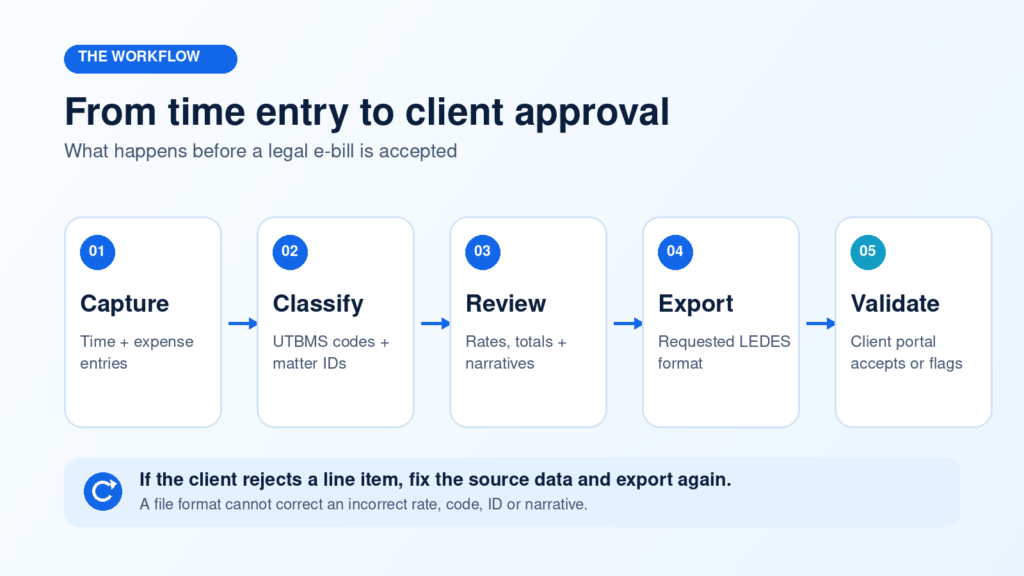
Good source data matters. Exporting a LEDES file does not repair vague narratives, inconsistent matter IDs, missing codes, unauthorized timekeepers, or rates that conflict with client approvals.
Does your law firm need LEDES billing?
LEDES capability becomes important when:
- A corporate legal department or insurer requires electronic invoice submission.
- The client’s portal validates task, activity, expense, or timekeeper codes.
- The firm handles matters under detailed outside counsel billing guidelines.
- Clients want structured spend reporting across matters and firms.
- The billing team needs a repeatable way to export approved invoice data.
A firm whose clients accept ordinary invoices may not need LEDES for every matter. Even so, having the capability can remove friction when the firm begins working with larger corporate clients, insurance carriers, or legal departments that use e-billing platforms.
LEDES billing readiness checklist
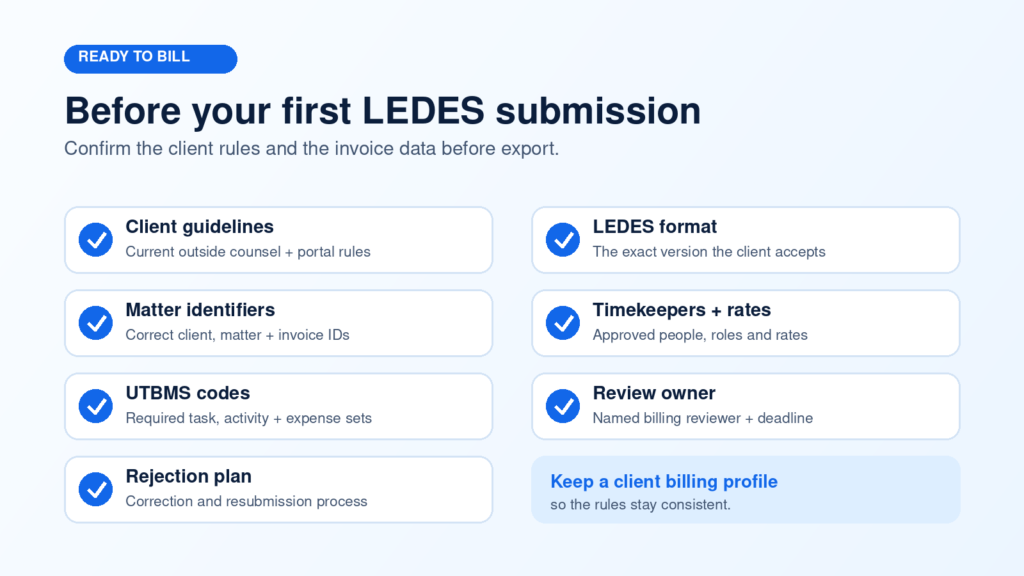
Before producing the first file, confirm that the firm has:
- The client’s current outside counsel guidelines and portal instructions.
- The required LEDES format and any client-specific field rules.
- Correct client and matter identifiers in the billing system.
- Approved timekeeper names, IDs, classifications, and rates.
- The correct UTBMS task, activity, and expense code sets.
- A clear internal review owner and submission deadline.
- A process for handling rejections, corrections, and resubmissions.
How to set up LEDES billing in Lawcus
Lawcus combines time and expense tracking, invoicing, and billing settings in one practice management environment. The exact workflow may vary by firm and client, but the following sequence creates a reliable starting point.
1. Confirm the client’s billing rules
Collect the required format, portal details, matter IDs, code sets, approved rates, billing period rules, narrative requirements, tax instructions, and any restrictions on expenses or block billing. Create an internal client billing profile so the rules do not live only in someone’s inbox.
2. Configure billing settings
Set the firm’s time tracking, expense, tax, invoice template, rate, and invoice approval preferences before creating the first bill. Lawcus provides a billing settings guide that links to the relevant configuration areas.
3. Enable the required UTBMS codes
Enable UTBMS codes for the matters that require them. Lawcus documents how to enable UTBMS codes for LEDES invoicing and provides a separate reference showing the UTBMS billing codes available in the platform.
Do not enable every code indiscriminately. Limit the working set to the code family and client requirements that apply to the matter. A shorter, governed list reduces miscoding and makes time entry easier.
4. Standardize time and expense entry
Require timekeepers to select the correct matter and codes when they record work. Narratives should describe the work clearly enough for a reviewer to understand its purpose without revealing privileged information. Billing teams should also check dates, units, rates, and expense documentation before invoice creation.
5. Create and review the invoice
Create the invoice in Lawcus, then review it against the client’s guidelines. Confirm totals, matter IDs, timekeepers, rates, descriptions, codes, discounts, taxes, and billing dates. Use an approval workflow when more than one person must review the bill.
6. Export the requested LEDES file
For a matter configured with UTBMS codes, Lawcus allows a billing user to open the invoice, use More Actions, and download a LEDES 1998B file. Test the first export before the deadline so the team has time to correct source data or configuration problems.
7. Submit, record the result, and fix the source
Upload the file through the client’s designated system and record whether it was accepted, rejected, or accepted with adjustments. If a line fails validation, correct the underlying time entry, rate, identifier, code, or invoice record before exporting again. Avoid editing the flat file manually unless the client’s process specifically requires it and the firm can verify the result.
Common reasons LEDES invoices are rejected
Most preventable rejections trace back to source data or client-specific rules. Common examples include:
- Missing or incorrect client, matter, invoice, or timekeeper identifiers.
- A task, activity, or expense code that is invalid for the matter.
- An unapproved timekeeper or a rate that does not match the client’s approved rate.
- Invoice totals that do not reconcile with line-item totals.
- Dates outside the permitted billing period or duplicate invoice numbers.
- Descriptions that are too vague, combine unrelated work, or violate the client’s narrative rules.
- Disallowed expenses, missing documentation, or tax and currency fields that do not match the requested format.
A rejected invoice should become a process-improvement signal. Track the rejection reason, identify where the bad data entered the workflow, and add a validation or review step that prevents the same error on the next bill.
What to look for in LEDES billing software
When comparing legal billing software, ask whether it can:
- Support the LEDES format your clients actually require.
- Apply the relevant UTBMS code sets at the time-entry and expense-entry stage.
- Maintain client, matter, timekeeper, rate, tax, and currency data consistently.
- Route invoices through review and approval before export.
- Keep time, expenses, billing, trust accounting, and payment records connected.
- Preserve an audit trail for corrections and resubmissions.
- Automate reminders or invoice creation without removing human billing review.
Lawcus supports legal billing and invoicing alongside matter management, workflow automation, and trust accounting. Firms can keep billing activity connected to the matter record while using documented UTBMS and LEDES 1998B workflows for clients that require e-billing.
Frequently asked questions
Is LEDES the same as UTBMS?
No. LEDES defines a structured format for exchanging legal billing data. UTBMS codes classify the legal task, activity, expense, or related billing dimension placed into that data. A client may require both.
Is LEDES 1998B still used?
Yes. The LEDES Oversight Committee continues to publish the 1998B specification and sample file, and many legal billing systems support it. The client’s billing instructions should still determine which format the firm uses.
Can I submit a PDF instead of a LEDES file?
Only if the client allows it. A PDF and a LEDES file serve different purposes. The PDF is designed for human reading, while the structured LEDES file is designed for machine validation and processing.
Who should own LEDES billing at a law firm?
One person or team should own client billing guidelines, configuration, invoice review, submission, and rejection tracking. Lawyers and timekeepers still own accurate entries and narratives, but centralized billing ownership prevents inconsistent interpretation of client rules.
Should a firm edit a LEDES file manually?
Manual editing is risky because it can break delimiters, field order, totals, or required values. Correct the billing data in the source system and export a fresh file whenever possible.
Build a repeatable e-billing process
Reliable LEDES billing starts before invoice export. It depends on clean matter setup, approved rates, consistent UTBMS coding, clear narratives, and a review process aligned with each client’s rules.
If your firm wants to connect matter work, time and expenses, invoice approvals, LEDES 1998B exports, trust accounting, and payment follow-up, explore Lawcus billing and invoicing software or schedule a demonstration.
Categories
Automation BlogsBilling & Accounting BlogsGeneral PracticeMarketing BlogsNews & UpdatesPractice Management BlogsRecent Posts
LEDES Billing for Law Firms: Formats, UTBMS Codes and Setup

Law Firm Client Intake Checklist: From Inquiry to Engagement

Law Firm CRM vs Practice Management Software: What Does Your Firm Actually Need?

Feature Release: August 2026
The Lawcus Mobile App Is Here: Manage Legal Work From Anywhere
Practice Management
Automation
Client Intake & CRM
Billing & Accounting
Practice Area
Compare
Resources
Lawcus Inc.
4445 Eastgate Mall, Suite 200,
San Diego, CA 92121


