-

-
-
Product

What's New?

Majority of our clients have saved upto 8 hours every week, by automating iterative and difficult processes.
Learn more
Solutions
One app, all things legal
-
-
-
 Gmail
Gmail  Microsoft 365
  Wisetime
  Dropbox
  Zapier
  Quickbooks
  vs CosmoLex
  vs PracticePanther
  vs AbacusNext
  vs Caret Legal
  vs Clio
  vs MyCase


Feature Release: January 2026
5th January 2026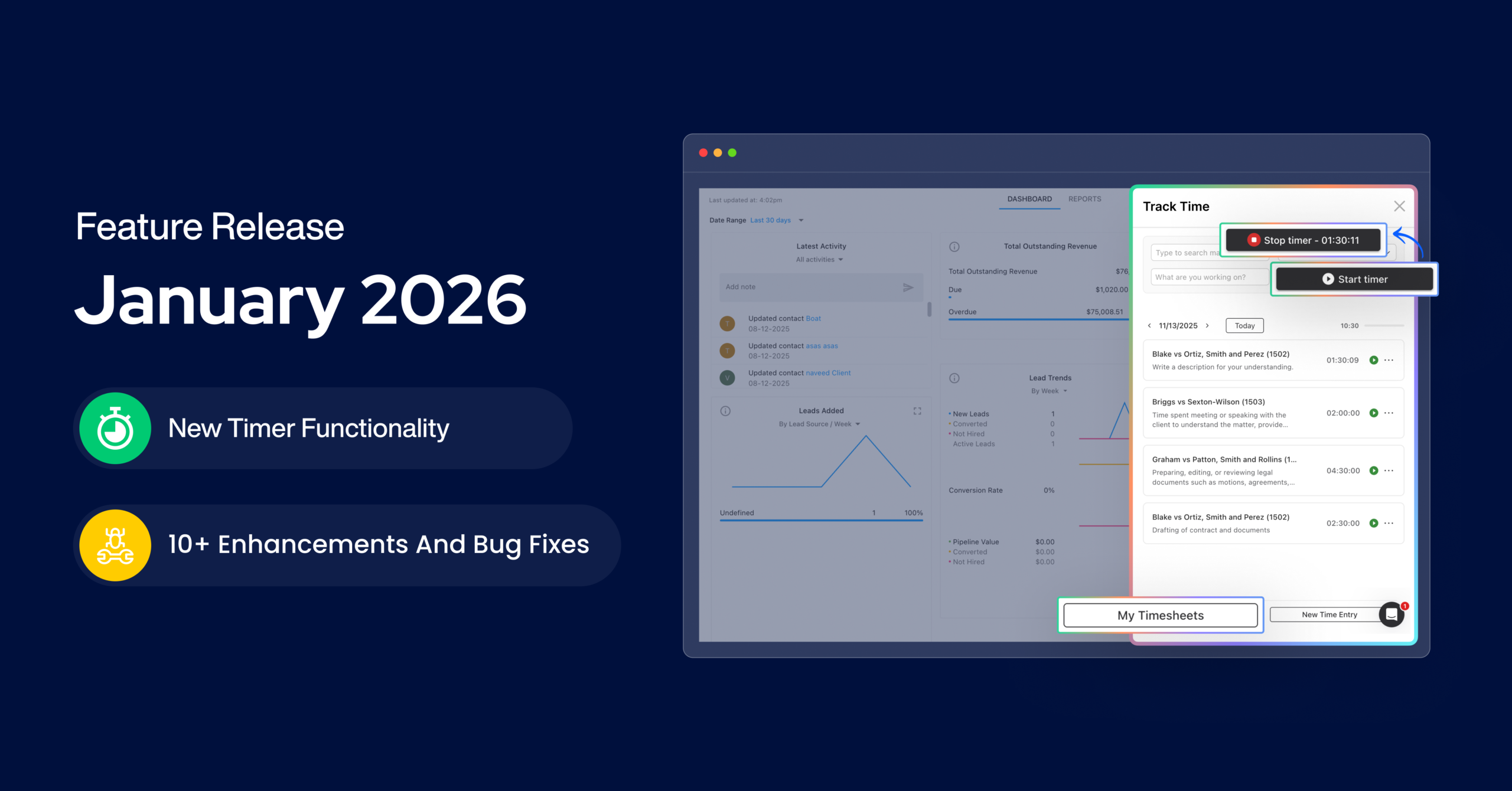
New Timer Functionality
Introducing the all-new, enhanced Time experience in Lawcus, a smarter, cleaner, and more intelligent way for legal professionals to capture and manage time. This upgrade isn’t just cosmetic. It’s a complete rethink of how attorneys, paralegals, and law firm teams log their work throughout the day.
From the moment a time entry is created, you can refine details, add descriptions, adjust billing data, duplicate entries, or discard non-billable activity, all without friction. The experience is optimized to reduce missed time, eliminate repetitive typing, and help teams bill more accurately.
A major improvement in this release is the suite of flexible save actions.
- Save is ideal for clean, one-off billable activities.
- Save & Add New supports high-volume days where attorneys jump rapidly between hearings, calls, depositions, and document reviews.
- Update & Duplicate is built for recurring legal tasks such as weekly client check-ins, monthly reports for insurers, iterative drafting of motions, or phased discovery work.
- Discard Tracked Time when internal research or exploratory work shouldn’t be billed. Discard helps keep timesheets organized and accurate.
The brand-new Timer window provides a consolidated, day-by-day view of all your captured time. Entries are grouped by date, making it effortless to understand your daily output or revisit work from earlier in the week. You can instantly reopen past entries to make adjustments, update information, correct durations, or align billing details, all from one clean panel.
Another highlight of this upgrade is the ability to instantly restart previous entries. For multi-day matters, ongoing drafting, long-term negotiations, or recurring workflows, picking up exactly where you left off becomes effortless. Lawcus automatically restores your previous details, helping you maintain accuracy even across fragmented work sessions.
For those who want full visibility, the updated My Timesheet view consolidates everything into a single, structured workspace. This allows attorneys and billing teams to review activity, validate their entries, identify missing time, and ensure accuracy before invoices are generated.
Across all these improvements, one theme is clear: this update is designed to reduce leakage, improve billing hygiene, and make timekeeping intuitive rather than tedious. Whether you’re a litigator juggling multiple hearings, a corporate attorney drafting several documents in parallel, an immigration lawyer managing recurring tasks, or a managing partner reviewing team activity, the new Time experience in Lawcus delivers clarity, efficiency, and precision at every step.
Other Enhancements & Improvements
Improved Billable Clients View
- Closed matters with outstanding WIP are now displayed at the bottom of the Billable Clients list.
- Matter names are clearly shown for better visibility.
- Added a filter to view clients based on Matter status.
Consistent Numeric Formatting Across Lists
- All numeric values in list views are now:
- Right-aligned
- Displayed with two decimal places
- Improves readability and consistency across reports.
Clearer Contact Identification in Emails & SMS
- Contact dropdowns now show:
- Email addresses when sending emails
- Phone numbers when sending SMS
- Prevents confusion when contacts share the same name.
Workflow History Performance Improvement
- Added pagination for workflows with large histories.
- Improves loading performance and usability.
Quick Copy for Contact Details
- Users can now copy phone numbers, email addresses, and addresses directly from contact records.
Expense Receipt Uploads
- Expense forms now support receipt image uploads.
- Uploaded receipts can be viewed directly from the expense record.
Copy Calendar Events
- Users can now duplicate existing calendar events with a single click.
Bug Fixes
Interactions & Communication
- Fixed an issue where phone logs were not appearing correctly on Matter pages.
- Resolved SMS sending errors and page reload issues.
- Lead names now correctly appear in SMS dropdowns.
- Leads now populate correctly when sending e-signature requests.
- Intake forms can now be sent successfully from the Leads page.
Time Tracking
- Fixed an issue where users could not change the Matter while adding time from the Timer window.
Billing & Invoicing
- Resolved an issue where invoice balances displayed -0.00 instead of 0.00.
- Fixed incorrect default due dates when creating invoices, credits, and trust requests from the Matter Financial Info tab.
Workflow & UI
- Improved stability when opening and sending SMS from different areas of the application.
- Fixed scrolling issues in Workflow forms.
Practice Management
Automation
Client Intake & CRM
Billing & Accounting
Practice Area
Compare
Resources
Lawcus Inc.
4445 Eastgate Mall, Suite 200,
San Diego, CA 92121


