-

-
-
Product

Solutions
One app, all things legal

Compare
-
-
-

 Gmail
 Microsoft 365
 Wisetime
 Dropbox
 Zapier
 Quickbooks
 vs CosmoLex
 vs PracticePanther
 vs AbacusNext
 vs Caret Legal
 vs Clio
 vs MyCase
 vs Smokeball
 vs Filevine


Feature Release: October 2026
2nd November 2026
This release brings 12 enhancements and 21 bug fixes across Lawcus. Highlights include the introduction of Lawcus Concierge, new data export permissions, enhanced Billing and Task Insights, improved client task management, easier trial extensions, and a redesigned Side Menu Bar.
We’ve also resolved issues across leads, matters, billing, time tracking, custom fields, integrations, workflows, and the mobile app to deliver a smoother and more reliable experience.
Feature Releases
Introducing Lawcus Concierge – Enhanced What’s New Experience
We’ve introduced Lawcus Concierge, a centralized hub designed to make it easier to stay connected with everything happening in Lawcus. Whether you’re exploring new features, sharing feedback, or looking for assistance, Lawcus Concierge brings essential resources together in one convenient location.
With the enhanced What’s New experience, users can stay informed about the latest product updates and improvements. You can also submit feature requests, track their progress, and vote on ideas you’d like to see implemented.
Lawcus Concierge also makes it easier to book personalized training sessions, connect directly with the support team, and explore Help Center articles and guides.
Learn More: Lawcus Concierge
Introducing Task Insights – Better Visibility into Team Productivity
We’ve introduced Task Insights, providing firms with a clearer view of task management, team workloads, and overall productivity through visual reporting.
Task Insights helps users track task progress, review completion trends, and identify tasks that are pending or overdue. With better visibility into task activity, firms can understand how work is progressing, recognize potential delays, and identify areas that may require attention.
This enhancement supports more informed workload management and helps teams stay accountable for their responsibilities while keeping important work on track.
Learn More: Task Insights in Lawcus
Easily Extend Your Lawcus Trial
We’ve simplified trial management by allowing teams to extend their Lawcus trial directly from Manage Subscription, without needing to contact the support team.
This enhancement gives firms greater flexibility when evaluating Lawcus, providing additional time to explore features, test workflows, and determine how the platform fits their practice management needs.
By making trial extensions available through the subscription management interface, teams can manage their evaluation experience more independently and continue exploring Lawcus with fewer interruptions.
Redesigned Side Menu Bar for Easier Navigation
We’ve redesigned the Lawcus Side Menu Bar to provide a cleaner, more organized, and customizable navigation experience.
The updated menu makes it easier to move between modules and access frequently used information. Users can quickly navigate to recent and favorite matters, add commonly used links, and customize quick actions based on their everyday workflows.
By bringing important shortcuts and navigation options into one accessible location, the redesigned Side Menu Bar helps reduce unnecessary navigation and creates a more personalized workspace.
Learn More: Side Menu Bar
Introducing Billing Insights – Smarter Financial Visibility
We’ve introduced Billing Insights, providing firms with a centralized view of their financial performance through interactive charts and reports.
Billing Insights makes it easier to monitor billing trends, review collected payments, and analyze outstanding balances without manually compiling information from multiple reports. The visual dashboards help users understand financial activity and identify patterns that may affect collections and cash flow.
With clearer financial information readily available, firms can track performance, evaluate billing efficiency, and make more informed financial decisions.
Learn More: Billing Insights in Lawcus
New Permission – Export Company Data
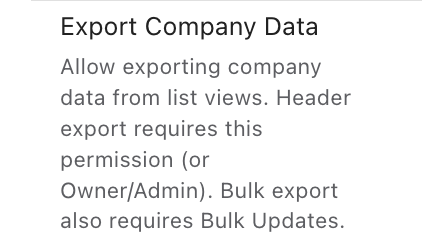
We’ve introduced a new Export Company Data permission, giving firms greater control over who can export company information from Lawcus.
When enabled, this permission provides users with a dedicated Export option across list view pages, allowing them to export data directly without selecting individual records. The exported data is generated as a CSV file and sent to the user’s registered email address.
This permission works independently of both Bulk Update and Reports permissions, allowing administrators to grant export access without providing additional capabilities. The permission is enabled by default for Firm Owners and Admins, while access for other roles can be managed through Roles & Permissions.
Learn More: How to Manage the Export Company Data Permission
Enhancements
Billing Insights – Firm Financial Summary Enhancement
We’ve improved the accuracy of the Paid column in the Firm Financial Summary within Billing Insights, ensuring that payments associated with time and expense entries are correctly reflected for the selected reporting period.
This enhancement provides a more reliable view of collected payments and helps firms review financial performance with greater confidence. By improving how payment information is reflected in the summary, firms can better evaluate billing activity and understand collections within a specific period.
Client Portal – Enhanced Client Task Management
We’ve enhanced task management in the Client Portal, allowing firms to assign tasks to clients even before they accept their portal invitations.
Previously, firms had to account for the client’s portal invitation status when preparing client-related tasks. With this improvement, users can assign tasks in advance, making it easier to organize client responsibilities and prepare the next steps without waiting for invitation acceptance.
This enhancement provides greater flexibility in coordinating client activities while maintaining control over when clients can access their assigned tasks through the portal.
Matter Number Column in List Views
We’ve added a Matter Number column to the Activities and Invoices list views, making it easier to identify and organize records associated with specific matters.
Users can now reference matter numbers directly from these list views without needing to open individual records to verify their associated matters. This provides additional context when reviewing activities or invoices, especially for firms managing a large number of matters.
The enhancement helps improve record identification and makes it easier to locate and work with matter-related information.
UI Enhancements – Reports, Login & Signup Pages
We’ve refreshed the user interface across the Reports, Login, and Signup pages to provide a cleaner, more modern, and consistent experience.
The updated designs improve the visual organization of these pages, making information easier to navigate and interactions more intuitive. These improvements help create a smoother experience for users accessing their accounts, getting started with Lawcus, or reviewing reports.
The changes are part of our ongoing efforts to improve usability and maintain a consistent look and feel throughout the platform.
Bug Fixes & Improvements
We’ve also addressed several issues across Lawcus to improve platform stability, reporting accuracy, and day-to-day usability.
Lead & Matter
Lead Management – Phone Number Validation Fix
Improved phone number validation for leads created through intake forms, allowing users to edit and save lead details without requiring a phone number when the field is optional.
Matter Insights – Reporting Accuracy Fix
Improved the Open Matters Without Recent Work in 30 Days chart to accurately reflect recent activity and handle missing date values, ensuring more reliable reporting.
Not Hired Reasons – Reporting and Inline Editing Fix
Fixed an issue where Not Hired reasons and lead counts were not displayed consistently across charts, lead records, and reports. Also resolved an inline editing issue to ensure changes to Not Hired reasons are saved correctly and reflected across the platform.
List View – Column Reordering Fix
Improved the list view experience by ensuring that changes to column order are saved and retained when refreshing the page or navigating between screens.
Billing
Invoice PDF Attachment Fix for Bulk Emails
Fixed an issue where invoice PDFs were not attached when sending invoices in bulk using the Send by Email option from the Invoices screen. Invoice PDFs are now automatically attached to outgoing emails, whether sending a single invoice or multiple invoices.
Invoice Receipt Download Fix
Improved the invoice receipt download functionality to ensure payment receipts are generated and downloaded correctly as PDFs without errors.
Transaction Date Consistency Fix
Improved date consistency across transactions and the Payment Ledger by Date report, ensuring payment dates are accurately reflected based on the firm’s configured time zone.
Time Entries – Bulk Update Enhancement
Restored the ability to update the Billable and Show on Invoice options for multiple time entries at once, making it easier to manage billing preferences without editing each entry individually.
Client-Level Rates – Display Fix
Improved the Client-Level Rates interface to ensure proper display and alignment when adding multiple Individual Timekeeper Rate entries to a contact.
Custom Fields
Custom Field Editing Fix During Active Timer
Improved the time tracking experience by ensuring users can enter and edit custom field values while a timer is running, without interruptions.
Custom Groups – Scrolling Fix
Improved navigation within Custom Groups by ensuring smooth scrolling through the Custom Fields and Associated Practice Areas lists, making it easier to view and manage all available options.
Custom Fields – Typing and Cursor Fix
Improved the custom field editing experience by resolving cursor focus issues, allowing users to start typing with a single click and enter text continuously without interruptions.
Matter Custom Fields – Display Fix
Improved custom field management by ensuring deleted custom fields are correctly removed from the matter view and no longer appear after deletion.
UI Fixes
Timer – Display Fix in User Settings
Improved the timer interface to ensure it displays correctly without overlapping the Email Signature section when accessed from User Settings > Profile.
Integrations
Box Integration – Sign-In Fix
Improved the Box integration experience by resolving repeated sign-in prompts, ensuring users can seamlessly access their Box files within Lawcus matters.
Zapier Integration – Bug Fixes
Enhanced Zapier integration reliability by improving lead creation and ensuring custom fields are consistently available in the Update Company and Update Lead actions.
OneDrive Integration – Display Fix
Improved the OneDrive integration experience by ensuring the Open in OneDrive option displays consistently across matters without requiring a page refresh.
Interactions
Phone Logs – Related Contacts in Guest Selection
Enhanced phone log creation by allowing users to select Related Contacts in the Guests field, making it easier to track communications with all contacts associated with a matter.
Mobile App
Mobile App – Date Format Fix
Improved date format compatibility in the mobile app, ensuring users can create Time Entries and Expenses seamlessly using their configured Lawcus date format.
Workflows
Workflow Entry Rules – Billing Type Filter
Enhanced workflow automation by adding Billing Type as a filter in Workflow Entry Rules, allowing firms to create targeted workflows based on matter billing types, such as Flat Rate, for more efficient automation.
Categories
Automation BlogsBilling & Accounting BlogsGeneral PracticeMarketing BlogsNews & UpdatesPractice Management BlogsRecent Posts
Feature Release: October 2026

AI Client Communication for Law Firms: A Human Review Workflow

Law Firm Referral Marketing: Build a Relationship and Follow-Up System
Introducing Matter Access Center: Manage Matter Participants and Access in One Place

Client Portal Communication for Law Firms
Practice Management
Automation
Client Intake & CRM
Billing & Accounting
Practice Area
Compare
Resources
Lawcus Inc.
4445 Eastgate Mall, Suite 200,
San Diego, CA 92121


